
Digital marketing advice is often written for companies with specialist teams and large budgets. Small businesses need something different: a sequence that builds on itself, uses limited time well and avoids spending money on ads before the basics can turn visitors into customers. This roadmap is that sequence.
Quick answer: Start with the foundations (a clear offer, target customer and simple brand kit), then build a fast, mobile-friendly website with analytics, claim your Google Business Profile and collect reviews, publish content that answers customer questions, choose one or two social channels, build an email or WhatsApp list, and only then scale with paid ads. Measure each stage before adding the next.
Stage 1: Foundations
Before any channel, get clear on three things:
- Who you serve. Describe your best customers: their problem, where they look for solutions and what makes them choose.
- What you offer and why you. One sentence explaining what you do, for whom, and the main reason to choose you over alternatives.
- How you look and sound. A simple brand kit: logo, two or three colours, one or two fonts, and a few words describing your tone. See visual brand identity.
These decisions make every later step faster, from writing web pages to designing social posts.
Stage 2: A website that works
Your website is the one channel you fully own. It does not need to be elaborate, but it must:
- Load quickly on mobile. Oversized images are the most common problem; our website speed checklist and JPG compressor help.
- Explain the offer clearly above the fold, with an obvious next step: call, book, buy or enquire.
- Build trust with real photos, reviews, contact details and an about page.
- Have analytics installed from day one. See GA4 for beginners.
Stage 3: Local visibility
If you serve a local area, your Google Business Profile can bring more calls and visits than your website. Complete every field, choose the right categories, upload real photos regularly and ask happy customers for reviews. Our guide to Google Business Profile photos covers the image side. Keep your name, address and phone number consistent across directories and social profiles.
Stage 4: Content that answers questions
Content marketing and SEO turn your expertise into steady traffic. Start by listing the questions customers ask before buying, then write clear, helpful pages that answer them. Use keyword research to check how people phrase those questions, and structure answers so search engines and AI assistants can quote them; see answer engine optimization. Our content marketing strategy guide shows how to plan it.
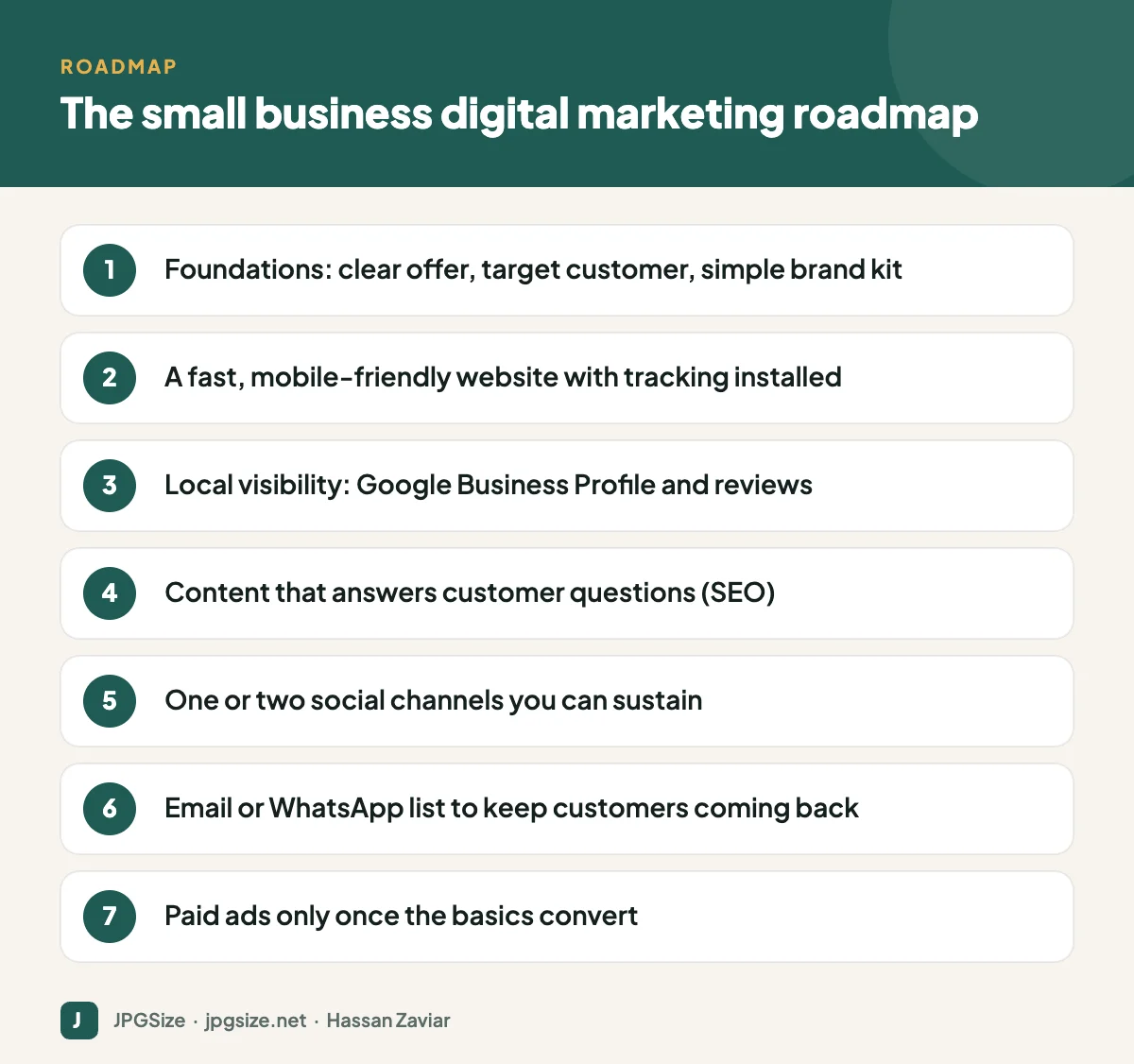
Stage 5: Social media, focused
Pick one or two platforms where your customers spend time, and do them consistently rather than spreading thin. Plan with a social media content calendar, use the right image sizes and respond to messages quickly. For many local businesses in South Asia, Instagram, Facebook and WhatsApp are the core; for B2B, LinkedIn.
Stage 6: Own your audience with email or WhatsApp
Social platforms can change their algorithms overnight; a list of customers who opted in to hear from you is an asset you control. Offer something useful in exchange for sign-ups (a guide, a discount, early access), send genuinely helpful messages and track what drives sales. See email marketing images and WhatsApp Business marketing.
Stage 7: Paid advertising
Ads amplify what already works. Once your website converts visitors and you know which offers and messages resonate, test small budgets on Google Ads (for people actively searching) or Meta ads (for discovery). Send traffic to focused landing pages, prepare creative in the right Google Ads image sizes and track conversions properly before scaling spend.
Where AI fits
AI tools can help at every stage: drafting content, creating and resizing images, summarising customer feedback, automating replies and analysing data. Used well, they give small teams leverage. Tools like Predis.ai can also help small businesses create ads and engaging social media content using AI.
How to measure progress
| Stage | Metric to watch |
|---|---|
| Website | Conversion rate (enquiries or sales divided by visitors) |
| Local | Calls, direction requests and website clicks from your Business Profile |
| Content and SEO | Organic clicks and leads from Search Console and GA4 |
| Social | Link clicks, messages and saves, not only likes |
| Email or WhatsApp | List growth, click rate and revenue per message |
| Ads | Cost per lead or sale and return on ad spend |
Review monthly. Put more effort into what produces customers and less into what only produces activity.
A realistic time budget
A solo owner can make meaningful progress with around five hours a week: one hour on the Google Business Profile and reviews, two hours on one piece of content, one hour on social posts batched in advance and one hour on email or WhatsApp. Consistency over six to twelve months beats bursts of activity.
Common mistakes small businesses make online
- Starting with ads. Paying for traffic before the website converts is the quickest way to waste a budget.
- Being everywhere at once. Five neglected social accounts look worse than one active one.
- Using only stock photos. Real photos of your team, work and customers build far more trust.
- Ignoring reviews. Unanswered reviews, especially negative ones, influence buyers more than most ads.
- Not tracking anything. Without analytics and simple conversion tracking, you cannot tell which efforts pay off.
- Heavy, slow pages. Uncompressed images and too many plugins cost both rankings and customers.
- Copying big brands. Large companies can afford awareness campaigns; small businesses usually need direct responses such as calls, bookings and sales.
Your first 90 days
- Days 1 to 30: define your offer and brand kit, fix your website basics (speed, clear calls to action, contact details) and install GA4.
- Days 31 to 60: complete your Google Business Profile, ask ten happy customers for reviews and publish your first three helpful articles answering customer questions.
- Days 61 to 90: launch a simple content calendar on one social platform, start collecting email or WhatsApp opt-ins, and review your numbers to decide what to double down on.
After 90 days you will have a working foundation and real data, which is the right moment to consider paid advertising.
Frequently asked questions
What is the best digital marketing strategy for a small business?
Build foundations first: a clear offer, a fast website with analytics, a complete Google Business Profile and helpful content. Then add one or two social channels and an email or WhatsApp list before investing in paid ads.
How much should a small business spend on digital marketing?
It varies widely by industry and goals. Start by investing time in free channels, then test small paid budgets once your website converts, and scale spending based on measured return.
Which digital marketing channel works fastest?
Paid search ads can produce results quickly if your offer and landing page are strong. SEO and content take longer but build lasting, lower-cost traffic.
Do I need a website if I have social media?
Yes. Social platforms control your reach and can change the rules. A website is an asset you own, and it is essential for search visibility and credibility.
Sources and further reading
About the author: Hassan Zaviar writes about image optimization, SEO, AI and digital marketing for JPGSize and works on the site’s free browser-based image tools. Last reviewed: 24 September 2026. Spotted something out of date? Tell us and we will update it.

