
Every platform crops, compresses and displays images differently, and they change their layouts regularly. This cheat sheet collects the sizes that matter for business accounts in 2026, with the aspect ratios behind them, so you can design once and export correctly for each channel.
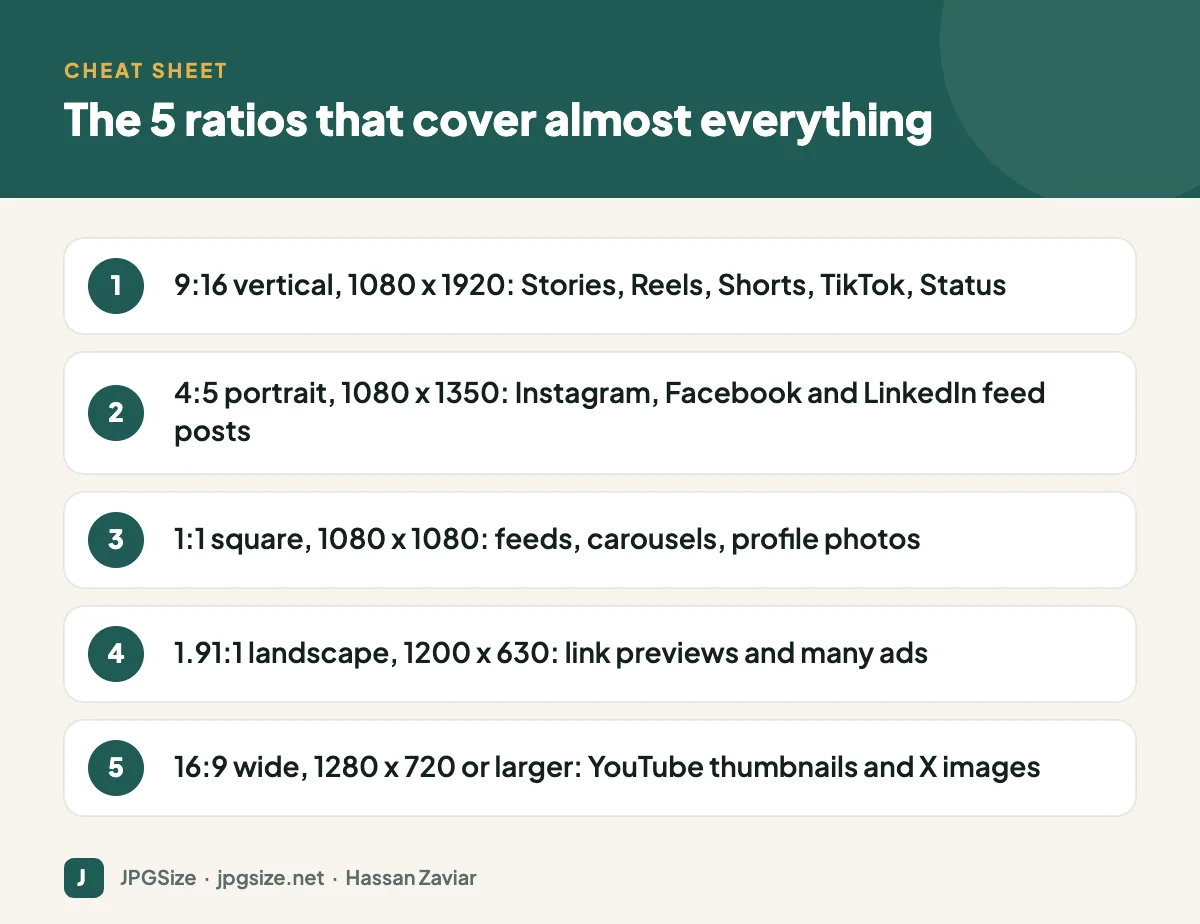
Quick answer: The most useful sizes in 2026 are 1080 x 1920 (9:16) for Stories, Reels, Shorts and TikTok; 1080 x 1350 (4:5) for Instagram, Facebook and LinkedIn feed posts; 1080 x 1440 (3:4) for Instagram’s newer portrait format; 1080 x 1080 (1:1) for square posts; 1200 x 630 (1.91:1) for link previews; and 1280 x 720 (16:9) or larger for YouTube thumbnails. Keep text inside safe zones and upload high-quality JPEG or PNG.
Sizes checked in September 2026 against platform help pages and current specifications. Platforms update layouts often, so check the platform-specific guides linked below before a major campaign.
| Format | Size (pixels) | Ratio |
|---|---|---|
| Profile photo | 320 x 320 (shown as a circle) | 1:1 |
| Feed post, portrait | 1080 x 1350 | 4:5 |
| Feed post, tall portrait | 1080 x 1440 | 3:4 |
| Feed post, square | 1080 x 1080 | 1:1 |
| Feed post, landscape | 1080 x 566 | 1.91:1 |
| Stories and Reels | 1080 x 1920 | 9:16 |
| Profile grid preview | Displayed at 3:4 | 3:4 |
Instagram switched the profile grid to 3:4 rectangles in early 2025 and added native 3:4 uploads. Full details, including safe zones for Reels covers, are in our Instagram image size guide.
| Format | Size (pixels) | Notes |
|---|---|---|
| Profile photo | At least 320 x 320 | Displayed as a circle |
| Page cover photo | At least 851 x 315 | Crops differently on mobile; keep key content centred |
| Feed image | 1080 x 1350 (4:5) or 1080 x 1080 | Portrait takes more screen space on mobile |
| Stories | 1080 x 1920 | Keep text away from top and bottom |
| Event cover | 1920 x 1005 | 1.91:1 |
| Link preview | 1200 x 630 | Controlled by your Open Graph image |
See Facebook image sizes for cover photo safe zones.
| Format | Size (pixels) | Notes |
|---|---|---|
| Personal profile photo | 400 x 400 | Up to 8 MB |
| Personal background | 1584 x 396 | 4:1 |
| Company logo | 400 x 400 | Square |
| Company cover | 4200 x 700 | 6:1 |
| Post image | 1200 x 627, 1080 x 1080 or 1080 x 1350 | Portrait and square stand out in the feed |
| Link preview | 1200 x 627 | From your Open Graph tags |
More in our LinkedIn image sizes guide.
YouTube
| Format | Size (pixels) | Notes |
|---|---|---|
| Video thumbnail | 1280 x 720 minimum recommended | 16:9; up to 50 MB since March 2026 |
| Channel banner | 2560 x 1440 | Safe area for text and logos 1235 x 338 in the centre |
| Profile picture | 800 x 800 | Displayed as a small circle |
| Shorts | 1080 x 1920 | 9:16 |
See YouTube thumbnail size and design.
X (Twitter)
| Format | Size (pixels) |
|---|---|
| Profile photo | 400 x 400 |
| Header | 1500 x 500 |
| In-feed image | 1600 x 900 (16:9) recommended; portrait also supported |
| Link card | 1200 x 628 |
Pinterest, TikTok and WhatsApp
| Platform and format | Size (pixels) | Ratio |
|---|---|---|
| Pinterest standard pin | 1000 x 1500 | 2:3 |
| TikTok video and photo posts | 1080 x 1920 | 9:16 |
| TikTok profile photo | At least 200 x 200 | 1:1 |
| WhatsApp Status | 1080 x 1920 | 9:16 |
| WhatsApp profile photo | 500 x 500 or larger | 1:1, shown as a circle |
Platform strategy for these channels is in our Pinterest marketing guide and WhatsApp Business marketing guide.
Safe zones: where to keep text
Vertical formats are covered by interface elements: profile names at the top, captions, buttons and reply bars at the bottom, and action icons on the right. A reliable rule for 1080 x 1920 designs is to keep text and logos out of the top 250 pixels and bottom 340 pixels, and away from the right edge. For grids and covers that are cropped differently on mobile and desktop, keep important content in the centre.
File formats and quality
- Photos: upload high-quality JPEG. Platforms re-encode everything, so starting with a clean, correctly sized file gives the best result.
- Graphics with text or logos: PNG often keeps text sharper, though platforms may still convert it.
- Size exactly: uploading at the platform’s preferred width (often 1080 pixels) avoids an extra resize by the platform. Our resize image in pixels tool is handy for this.
- Colour: export in sRGB so colours do not shift.
If your uploads look blurry or blocky, read why social media lowers your photo quality.
A workflow for multi-platform campaigns
- Design the master visual at a generous size with the subject centred and space around it.
- Create versions for the five core ratios: 9:16, 4:5, 1:1, 1.91:1 and 16:9.
- Check each version against its safe zones.
- Export as sRGB JPEG or PNG at the recommended size.
- Name files clearly by campaign, platform and ratio.
- Schedule them through your social media content calendar.
AI tools with generative expand can extend a design to a new ratio without awkward cropping; see generative AI for marketing.
Social media image sizes for ads
Paid placements generally follow the organic ratios but with stricter review and more placements. Meta ads (Facebook and Instagram) use 1:1 or 4:5 for feeds and 9:16 for Stories and Reels. LinkedIn sponsored content supports landscape, square and vertical images. Google’s Performance Max and Demand Gen campaigns need landscape (1.91:1), square (1:1) and portrait (4:5) images, covered in detail in Google Ads image sizes. Always upload separate creative for vertical placements rather than relying on automatic cropping.
How to keep this cheat sheet useful
Platforms rarely announce size changes loudly. A few habits keep your templates current:
- Review your design templates every six months against the platforms’ own help pages.
- When a platform redesigns its app, check how your existing posts and profile images now display.
- Keep editable master files, not just exported images, so you can re-export quickly.
- Record the date you last verified each size in your template library, just as we note the review date above.
Frequently asked questions
What is the best image size for social media in 2026?
There is no single best size. For feeds, 1080 x 1350 (4:5) works on Instagram, Facebook and LinkedIn. For Stories, Reels and TikTok, use 1080 x 1920 (9:16). For link previews, use 1200 x 630.
What size is an Instagram post in 2026?
1080 x 1350 (4:5) remains the most common portrait size, and Instagram also supports 1080 x 1440 (3:4), which matches the profile grid. Square 1080 x 1080 still works.
Why do my images look blurry on social media?
Usually because the upload was too small, the wrong ratio (so it was cropped and scaled) or already heavily compressed. Upload a high-quality file at the recommended size.
Do social media sizes change often?
Yes. Layout changes, such as Instagram’s 3:4 grid, happen every year or two. Check the platform’s help centre before important campaigns.
Sources and further reading
- Instagram Help Center
- Facebook Help Center
- LinkedIn Help
- YouTube Help: Add video thumbnails
- Pinterest Business: Creative best practices
About the author: Hassan Zaviar writes about image optimization, SEO, AI and digital marketing for JPGSize and works on the site’s free browser-based image tools. Last reviewed: 24 September 2026. Spotted something out of date? Tell us and we will update it.

