

Keyword research is how you discover what your potential customers type into search engines, how many of them do it, and what they expect to find. Done well, it tells you which pages to create, what to call them and what to put on them. You do not need an expensive tool to start.
Quick answer: Start with seed topics from your business and customer questions, expand them with Google autocomplete, People Also Ask and a keyword tool, check the search intent by looking at the current results, estimate difficulty, and prioritise keywords by business value and realistic ranking chances. Then group related keywords so each page targets one topic.
Key terms you need to know
| Term | Meaning |
|---|---|
| Search volume | Estimated average monthly searches for a keyword |
| Keyword difficulty | A tool’s estimate of how hard it is to rank, usually based on backlinks of ranking pages |
| Search intent | What the searcher wants: information, a specific site, to compare options, or to buy |
| Long-tail keyword | A longer, more specific phrase, usually with lower volume and clearer intent |
| SERP | The search engine results page |
| Topic cluster | A group of related keywords served by a pillar page and supporting pages |
Step 1: Brainstorm seed topics
Write down the core things your business offers and the problems it solves. Then add the questions customers ask you in emails, calls and in person. For a site like this one, seeds might be “reduce image size”, “passport photo size”, “image SEO” and “social media image sizes”.
Step 2: Expand your list
Use free sources first:
- Google autocomplete: type a seed keyword and note the suggestions. Add letters (a, b, c…) after the keyword for more ideas.
- People Also Ask and related searches on the results page.
- Google Search Console: if your site already has traffic, the Performance report shows the queries you appear for, including ones you did not target.
- Google Keyword Planner: free with a Google Ads account; good for volume ranges.
- Forums and communities: Reddit and Quora show the exact language people use.
Paid tools such as Semrush and Ahrefs add accurate volumes, difficulty scores, competitor keywords and question filters. They are worth it once you are publishing regularly.
Step 3: Check search intent
Search the keyword yourself and study the top results. Are they guides, product pages, tools, videos or local listings? That is what Google believes searchers want. If the top ten results for “resize image to 50kb” are all online tools, a long article will struggle to rank for it; a tool page (like our resize image to 50KB tool) matches the intent.
There are four broad intent types:
- Informational: “what is answer engine optimization”
- Navigational: “canva login”
- Commercial investigation: “best AI image generator for marketing”
- Transactional: “buy running shoes size 9”
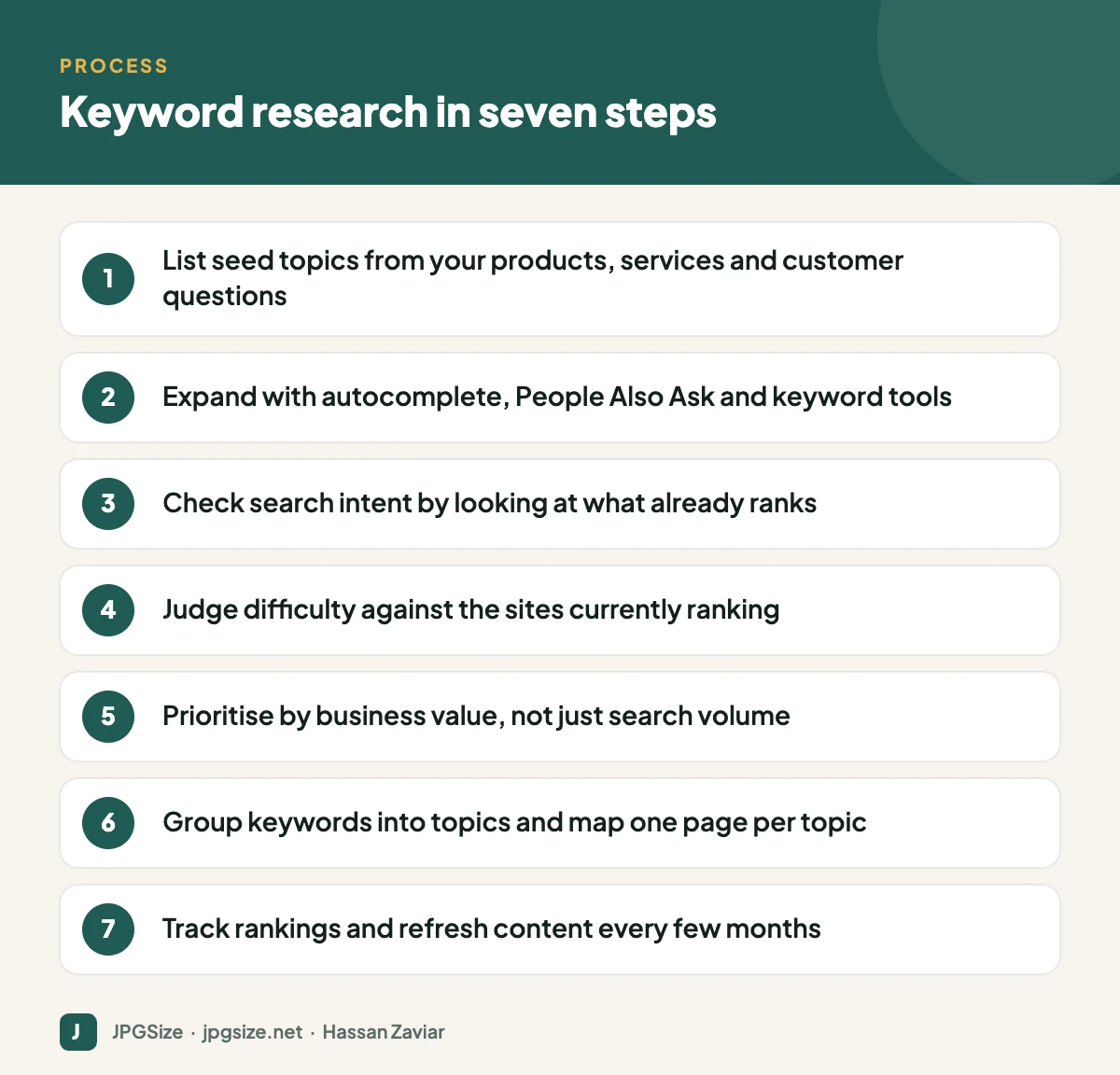
Step 4: Assess difficulty realistically
Tool difficulty scores are useful shortcuts, but look at the actual results. If the top results are huge brands with thousands of links, a new site should choose a more specific long-tail variant. If you see forums, thin pages or outdated articles ranking, that is an opportunity.
Step 5: Prioritise by business value
Rank your keyword list with three questions:
- Relevance: would someone searching this benefit from what we offer?
- Value: how close is this searcher to becoming a customer?
- Feasibility: can we realistically rank within six to twelve months?
A keyword with 200 searches a month from people ready to buy is often worth more than one with 20,000 searches from casual browsers.
Step 6: Group keywords and map them to pages
Many keywords share the same intent and should be served by one page, for example “passport photo size in cm”, “passport photo dimensions” and “passport size photo size”. Creating separate thin pages for each causes them to compete with each other. Group by intent, choose a primary keyword for each group and plan one page per group. Then connect the pages with a deliberate internal linking strategy.
Step 7: Create, publish and measure
Write content that fully answers the intent, with the primary keyword in the title, first paragraph and a heading where it reads naturally. Structure answers so they can be quoted in featured snippets and AI answers (see answer engine optimization). After publishing, track rankings and clicks in Search Console and refresh pages that stall.
Keyword research for AI search
AI-driven search features answer longer, conversational questions and often break one question into several searches. That makes question-style and long-tail keywords even more valuable. Look beyond single keywords to the whole set of questions around a topic, and make sure your content answers them clearly. Read generative engine optimization for more.
Beginner mistakes to avoid
- Targeting only high-volume head terms you cannot rank for yet.
- Ignoring intent and writing an article where searchers want a tool or a product.
- Stuffing keywords into text instead of writing naturally.
- Creating a new page for every tiny keyword variation.
- Never revisiting keyword data after publishing.
A worked example: from seed to content plan
Here is how the process looks for a small business that sells handmade leather bags online.
- Seeds: leather bags, leather laptop bag, leather tote, how to care for leather.
- Expansion: autocomplete and People Also Ask add phrases such as “leather laptop bag for 15 inch laptop”, “how to clean a leather bag”, “full grain vs top grain leather” and “leather tote bag for work”.
- Intent check: “leather laptop bag 15 inch” shows product and category pages, so it belongs on a category page. “How to clean a leather bag” shows guides and videos, so it becomes a blog article. “Full grain vs top grain leather” shows comparison articles.
- Difficulty: the head term “leather bags” is dominated by large retailers, so the business focuses first on the more specific phrases.
- Plan: one category page for laptop bags, one for totes, a pillar guide on leather bag care, and cluster articles on cleaning, conditioning and leather types, all linked together.
The same pattern works for any business: let intent decide the page type, let difficulty decide the order, and let business value decide what gets done first.
Keeping a simple keyword tracker
A spreadsheet is enough to start. Use columns for keyword, monthly volume, intent, difficulty, priority, target URL, current position and last updated. Sorting by priority gives you a content calendar, and adding a target URL to every keyword prevents two pages from competing for the same search.
Frequently asked questions
How do I do keyword research for free?
Use Google autocomplete, People Also Ask, related searches, Google Search Console and Google Keyword Planner. Combine them with the questions your customers ask directly.
How many keywords should one page target?
One primary keyword and its close variations and related questions. A single well-written page often ranks for hundreds of related terms.
What is a good keyword difficulty for beginners?
For a new site, look for low-difficulty, specific long-tail keywords where the current results are weak or outdated. Tool scores differ, so always check the actual results.
How often should I do keyword research?
Do a full round when planning content, then revisit quarterly. Search behaviour changes, and Search Console will reveal new queries you already appear for.
Sources and further reading
- Google Search Central: SEO Starter Guide
- Google Ads Help: About Keyword Planner
- Google Search Console
About the author: Hassan Zaviar writes about image optimization, SEO, AI and digital marketing for JPGSize and works on the site’s free browser-based image tools. Last reviewed: 24 September 2026. Spotted something out of date? Tell us and we will update it.

