
Google Analytics 4 (GA4) replaced Universal Analytics, which stopped processing data in July 2023. Many marketers still find GA4 confusing: the reports moved, the terminology changed and the default dashboards show more than most people need. The good news is that a small business only needs a handful of reports, set up correctly, to answer the important questions.
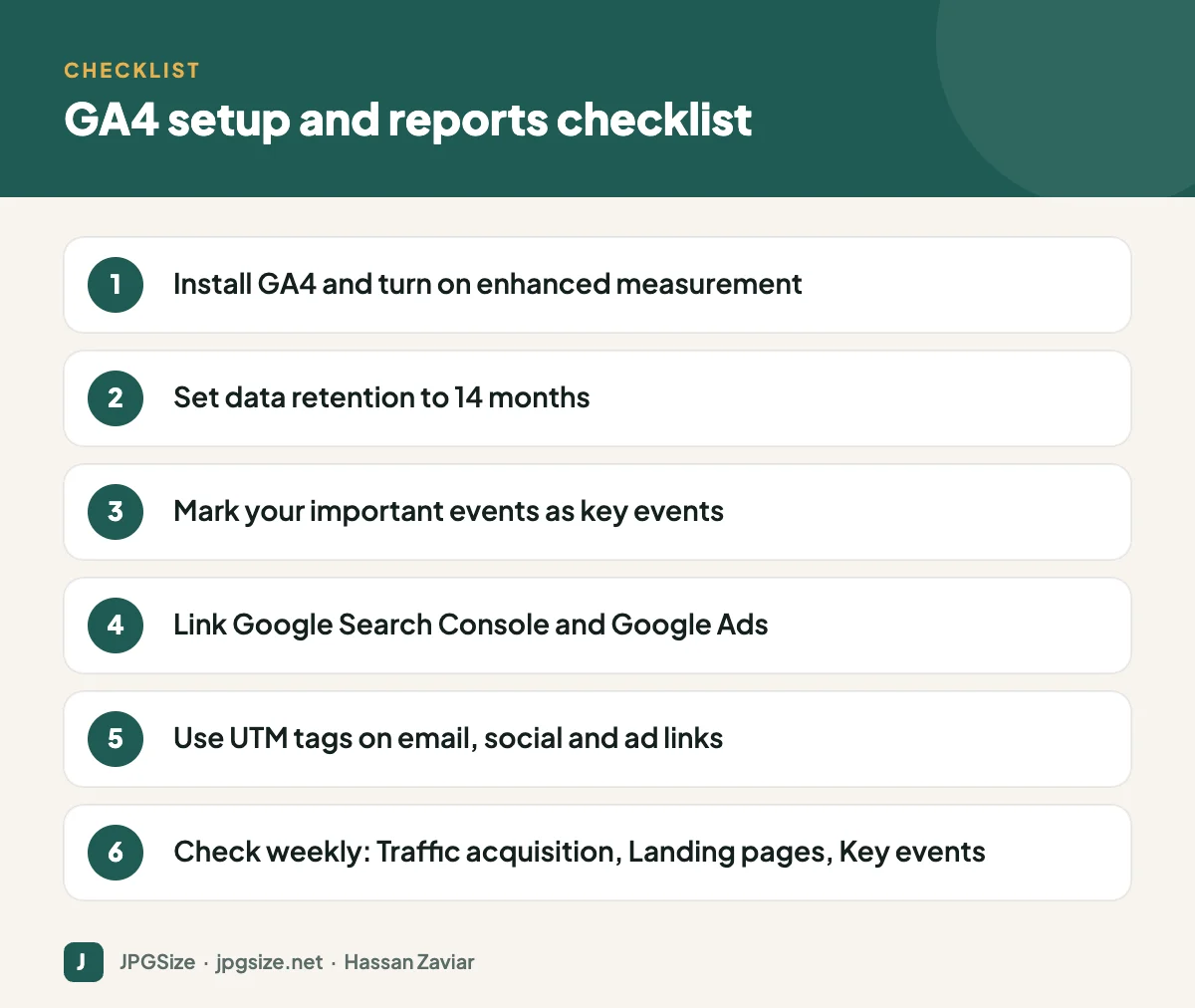
Quick answer: For GA4, first make sure tracking is set up properly: enhanced measurement on, data retention set to 14 months, important actions marked as key events, and Search Console and Google Ads linked. Then focus on six reports: Traffic acquisition, Landing page, Pages and screens, Key events, Search Console queries and Realtime for testing. Tag campaign links with UTM parameters so you can see which efforts drive results.
How GA4 thinks: events and key events
Universal Analytics was built around sessions and pageviews. GA4 is built around events: every interaction, including a page view, a scroll, a click on an outbound link or a form submission, is an event with parameters.
- Enhanced measurement automatically tracks page views, scrolls, outbound clicks, site search, video engagement, file downloads and form interactions when switched on.
- Key events (called conversions before 2024) are the events you mark as important for your business, such as purchase, generate_lead or a click on a WhatsApp button.
Engagement is also measured differently. An engaged session lasts longer than 10 seconds, includes a key event or has at least two page views. Engagement rate is the share of sessions that are engaged, and bounce rate in GA4 is simply its opposite.
Essential setup (do this once)
- Install GA4 through your CMS integration, a plugin such as Site Kit for WordPress, or Google Tag Manager.
- Turn on enhanced measurement in the web data stream settings.
- Set data retention to 14 months (Admin, Data collection and modification, Data retention). The default is only two months for detailed exploration data.
- Create and mark key events for your important actions: form submissions, purchases, phone clicks, WhatsApp clicks, sign-ups.
- Link Google Search Console to see organic search queries inside GA4, and link Google Ads if you advertise.
- Exclude internal traffic by defining your office IP addresses as internal traffic and activating the filter.
- Test with Realtime and DebugView to confirm events fire correctly.
The six reports worth checking
1. Traffic acquisition
Reports, Acquisition, Traffic acquisition. Shows sessions, engagement and key events by channel (Organic Search, Direct, Referral, Organic Social, Email, Paid Search). Change the dimension to “Session source / medium” for detail. This answers: where do our visitors and customers come from?
2. Landing page
Reports, Engagement, Landing page. Shows which pages people arrive on and how those sessions perform. This is the best report for judging which content and campaign pages bring engaged visitors and key events. Pair it with our content marketing strategy reviews.
3. Pages and screens
Reports, Engagement, Pages and screens. Shows views and engagement time for every page, including pages visited later in a session. Useful for spotting popular content and pages with poor engagement.
4. Key events
Reports, Engagement, Events, filtered to key events, or the Key events report. Shows how many times each important action happened. Combine with Traffic acquisition to see which channels drive them.
5. Search Console queries
Once linked, Reports, Search Console, Queries shows the search terms that bring people to your site, with clicks, impressions and position. It connects your keyword research to real results.
6. Realtime
Useful mainly for testing: check that a new campaign link, event or tracking change is working immediately after you set it up.
Tracking campaigns with UTM parameters
GA4 can only attribute traffic correctly if links tell it where they came from. Add UTM parameters to links in emails, WhatsApp broadcasts, social bios, QR codes and ads (Google Ads can be tracked automatically via auto-tagging):
- utm_source: where the link is placed, such as newsletter, instagram or whatsapp.
- utm_medium: the type of channel, such as email, social or cpc.
- utm_campaign: the campaign name, such as summer_sale_2026.
Use lowercase and consistent naming. Google’s Campaign URL Builder creates tagged links for you. See email marketing images and WhatsApp Business marketing for where these links typically go.
Tracking traffic from AI search
Visits from AI assistants such as ChatGPT, Perplexity and Gemini usually appear as referral traffic with sources such as chatgpt.com or perplexity.ai. In Traffic acquisition, filter “Session source” for these domains to see how much traffic AI answers send and which pages they land on. This is one of the few direct measures available for generative engine optimization.
Common beginner mistakes
- Leaving data retention at two months.
- Not marking any key events, so GA4 cannot show what matters.
- Counting internal visits from your own team.
- Inconsistent UTM naming (Instagram, instagram, IG) splitting data into many rows.
- Judging content by pageviews alone rather than engagement and key events.
- Changing tracking without testing in Realtime or DebugView.
A 15-minute weekly GA4 routine
- Traffic acquisition (5 minutes): compare this week with last week. Did any channel rise or fall sharply? Check key events per channel, not just sessions.
- Landing page (5 minutes): which pages brought the most engaged sessions and key events? Note new articles gaining traction and important pages losing visits.
- Search Console queries (3 minutes): look for queries with many impressions but low clicks; they are candidates for better titles or content updates.
- Notes (2 minutes): write down one action for the coming week, such as updating a page, promoting an article or fixing a broken form.
A short, regular habit is more useful than an occasional deep dive, because you notice changes while they are still easy to act on.
Explorations: when you are ready for more
GA4’s Explore section lets you build custom analyses. Two that beginners find useful are a free-form exploration with landing page and session source as rows and key events as values, and a funnel exploration showing where visitors drop out between viewing a product, adding to cart and purchasing. Start simple, and remember that exploration data is subject to your data retention setting.
Frequently asked questions
What is the difference between GA4 and Universal Analytics?
GA4 is event-based, while Universal Analytics was session-based. GA4 uses engagement metrics instead of traditional bounce rate and calls conversions “key events”. Universal Analytics stopped processing data in 2023.
What are key events in GA4?
Key events are the events you mark as important to your business, such as purchases, form submissions or phone clicks. They were called conversions before 2024.
Which GA4 report shows where visitors come from?
The Traffic acquisition report, under Acquisition, shows sessions and key events by channel and by source and medium.
How do I see Google search keywords in GA4?
Link Google Search Console to GA4, then use the Search Console Queries report. GA4 alone does not show organic keywords.
Sources and further reading
- Google Analytics Help: Get started with GA4
- Google Analytics Help: About key events
- Google Analytics Help: Collect campaign data with custom URLs
About the author: Hassan Zaviar writes about image optimization, SEO, AI and digital marketing for JPGSize and works on the site’s free browser-based image tools. Last reviewed: 24 September 2026. Spotted something out of date? Tell us and we will update it.

