
Google’s automated campaign types, Performance Max, Demand Gen and responsive display ads, assemble ads from the assets you provide and show them across Search, YouTube, Display, Discover, Gmail and Maps. The more complete and higher quality your image assets, the more placements your ads can use and the better they look.
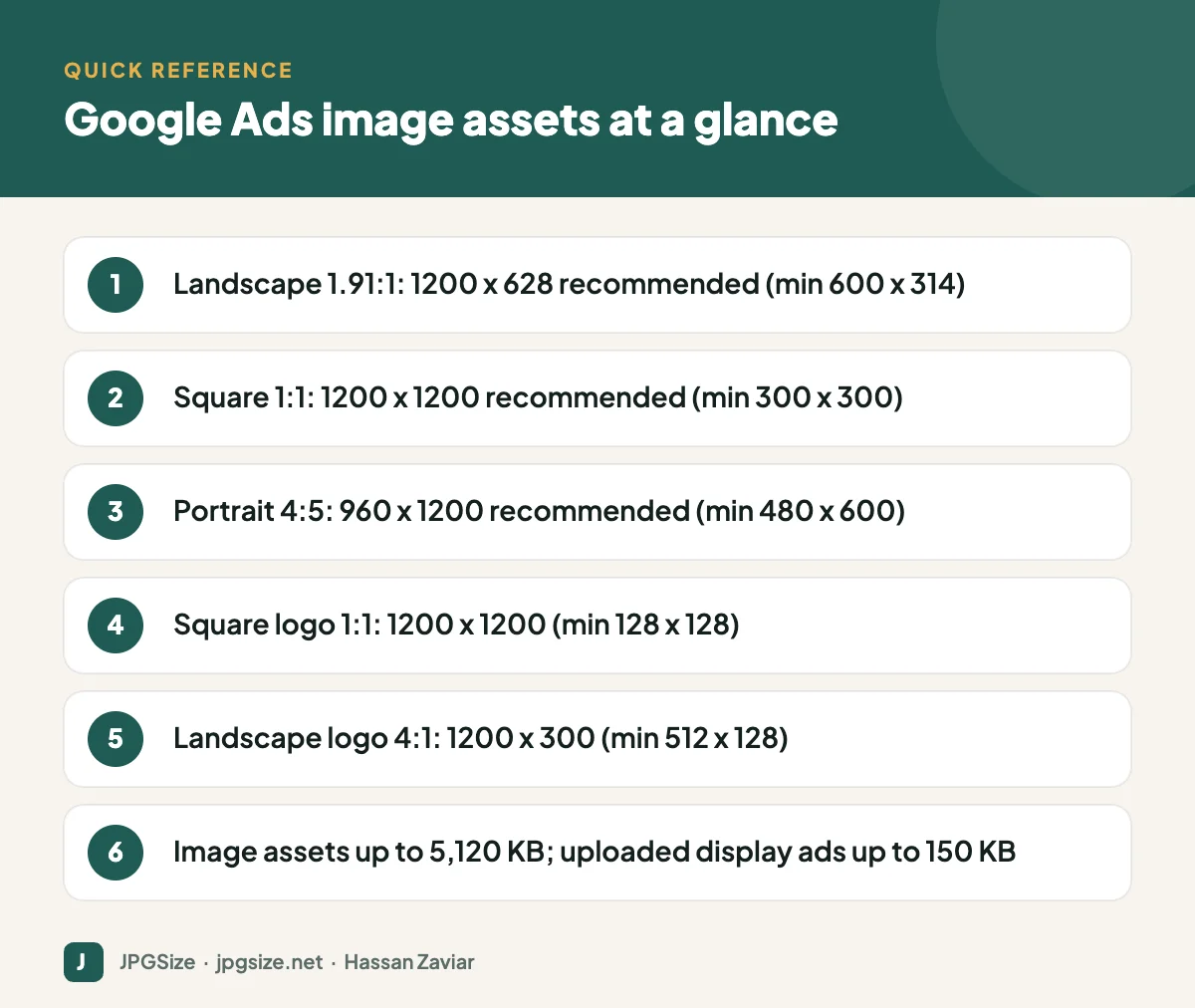
Quick answer: For Google Ads in 2026, upload landscape images at 1200 x 628 (1.91:1), square images at 1200 x 1200 (1:1) and portrait images at 960 x 1200 (4:5), plus a square logo at 1200 x 1200 and optionally a 4:1 landscape logo at 1200 x 300. Image assets can be up to 5,120 KB. Traditional uploaded display ads use fixed sizes such as 300 x 250 and 728 x 90 with a 150 KB limit.
Checked September 2026 against Google Ads specifications. Google updates asset requirements periodically, so confirm in Google Ads Help before launching.
Image assets for Performance Max and responsive display ads
| Asset | Aspect ratio | Recommended size | Minimum size |
|---|---|---|---|
| Landscape image | 1.91:1 | 1200 x 628 | 600 x 314 |
| Square image | 1:1 | 1200 x 1200 | 300 x 300 |
| Portrait image | 4:5 | 960 x 1200 | 480 x 600 |
| Square logo | 1:1 | 1200 x 1200 | 128 x 128 |
| Landscape logo | 4:1 | 1200 x 300 | 512 x 128 |
- File types: JPG, PNG and non-animated GIF.
- Maximum file size: 5,120 KB per image asset.
- Performance Max: each asset group can hold up to 20 images and 5 logos; you need at least one landscape image, one square image and one square logo, but providing the full range of ratios and more variety gives the system more to work with.
Demand Gen image assets
Demand Gen campaigns run on YouTube, Discover and Gmail, where visual quality matters a lot. They use the same three core ratios: landscape 1.91:1, square 1:1 and portrait 4:5. Portrait images take up more space on mobile feeds, so include them. Demand Gen also supports carousel image ads and vertical video; for video creative, plan 9:16 alongside 16:9 and 1:1.
Uploaded display ads (fixed sizes)
If you design complete banner ads yourself instead of using responsive assets, common sizes include:
| Size | Name |
|---|---|
| 300 x 250 | Medium rectangle |
| 336 x 280 | Large rectangle |
| 728 x 90 | Leaderboard |
| 300 x 600 | Half page |
| 160 x 600 | Wide skyscraper |
| 320 x 50 | Mobile banner |
| 320 x 100 | Large mobile banner |
| 970 x 90 | Large leaderboard |
Uploaded image ads are limited to 150 KB per file, so compression matters. Our reduce image size in KB and resize image to 100KB tools can hit exact limits.
Creative guidelines that affect approval and performance
- Keep text minimal. Google’s guidance for responsive image assets is that overlaid text should cover no more than about 20% of the image. Headlines and descriptions are supplied separately as text assets.
- No fake buttons or misleading UI. Images that look like clickable buttons or system warnings can be disapproved.
- Avoid collages and borders. Single, clear images perform better and fit automatic cropping.
- Centre the subject with some space around it, because Google may crop images slightly to fit placements.
- Use real products and people where you can; generic stock images are easy to ignore. If you use AI-generated visuals, keep them accurate and check the rights; see AI product photography.
- Logos: on a transparent or white background, with padding, so they are not cropped.
How to produce a full asset set efficiently
- Start with a high-resolution master image with the subject centred and plenty of space around it.
- Export three crops: 1200 x 628, 1200 x 1200 and 960 x 1200. Check each one; do not let automatic cropping cut off the product.
- Produce three to five variations of each ratio with different subjects or angles, so the system can test combinations.
- Compress each file sensibly with our JPG compressor, well under the 5,120 KB limit, without dropping below the recommended dimensions.
- Name files clearly, such as summer-sale-bag-square-v2.jpg, so reporting is easier to read.
AI tools with generative expand can extend an image to a new ratio without awkward crops; see generative AI for marketing.
After launch: read the asset reports
Performance Max and Demand Gen report on asset performance and combinations. Replace consistently low-performing images with new variations, keep the best performers and refresh creative every few months to avoid fatigue. Send clicks to fast, focused pages; see landing page optimization.
Text assets that go with your images
Images are only part of an asset group. Google combines them with text assets, so plan both together:
| Text asset | Limit | Quantity (Performance Max) |
|---|---|---|
| Headlines | 30 characters | 3 to 15 |
| Long headlines | 90 characters | 1 to 5 |
| Descriptions | 90 characters (one of 60 or fewer) | 2 to 5 |
| Business name | 25 characters | 1 |
Write headlines that work with any of your images, because the system mixes and matches them. Avoid repeating the same words across every headline; variety gives the system more combinations to test.
Common reasons image assets are disapproved or limited
- Low quality: blurry, stretched or heavily compressed images.
- Excessive text or overlays covering large parts of the image.
- Collages, grids or unnecessary white space around the subject.
- Upside-down, sideways or distorted images.
- Imitation of buttons or system messages.
- Restricted content under Google Ads policies, such as misleading claims or prohibited products.
When an asset is disapproved, the reason appears in the asset table. Fix the specific issue, export a clean version at the recommended size and upload it as a new asset.
Keeping a reusable creative library
Store every approved ad image with its campaign, ratio, date and performance notes. Over time you will see which subjects, colours and compositions work for your audience, and you can build new campaigns faster from proven creative.
Frequently asked questions
What image sizes does Performance Max need?
Landscape 1200 x 628 (1.91:1), square 1200 x 1200 (1:1) and portrait 960 x 1200 (4:5), plus a square logo of 1200 x 1200. You need at least one landscape image, one square image and one square logo.
What is the maximum file size for Google Ads images?
Image assets for responsive and Performance Max ads can be up to 5,120 KB. Uploaded display image ads are limited to 150 KB.
Can Google Ads images contain text?
Yes, but keep it minimal. Google advises that text should cover no more than about 20% of an image asset, because headlines and descriptions are added separately.
What is the most common Google display ad size?
The 300 x 250 medium rectangle is one of the most widely available sizes, along with 728 x 90, 300 x 600 and 320 x 50 for mobile.
Sources and further reading
- Google Ads Help: About responsive display ads
- Google Ads Help: About Performance Max campaigns
- Google Ads Help: About Demand Gen campaigns
About the author: Hassan Zaviar writes about image optimization, SEO, AI and digital marketing for JPGSize and works on the site’s free browser-based image tools. Last reviewed: 24 September 2026. Spotted something out of date? Tell us and we will update it.

