
Internal links are links from one page on your site to another. They are the only links in SEO that you completely control, and they do three jobs: help visitors find related information, help search engines discover and understand your pages, and pass authority from strong pages to the ones you want to rank.
Quick answer: A good internal linking strategy groups content into topic clusters: a pillar page that covers a subject broadly, and cluster pages that go deep on subtopics. Every cluster page links to the pillar and to closely related cluster pages with descriptive anchor text, links sit in the main content where readers see them, and no important page is left without internal links.
Why internal links matter for SEO
- Discovery. Google finds most new pages by following links. A page with no internal links (an “orphan page”) may never be crawled, or only through the sitemap.
- Context. Anchor text and the surrounding sentence tell search engines what the linked page is about. Google’s link best-practice documentation specifically recommends descriptive anchor text.
- Priority and authority. Pages that receive many internal links, especially from strong pages, are signalled as important. Links from your homepage and popular articles carry the most weight.
- User engagement. Relevant links keep readers on your site longer and move them towards pages that convert.
Topic clusters explained
A topic cluster is a group of pages about one broad subject. It has two parts:
- A pillar page: a comprehensive overview of the subject, targeting a broad keyword. On this site, our image SEO guide is a pillar.
- Cluster pages: detailed articles on specific subtopics, targeting narrower keywords. For image SEO these include how to write alt text, image file names, WebP vs AVIF vs JPEG and lazy loading.
The pillar links out to every cluster page, and every cluster page links back to the pillar and sideways to related clusters. The result is a tightly connected group of pages that demonstrates depth on the topic, which supports both rankings and the topical authority that E-E-A-T describes.
How to build your internal linking strategy
Step 1: Map your topics
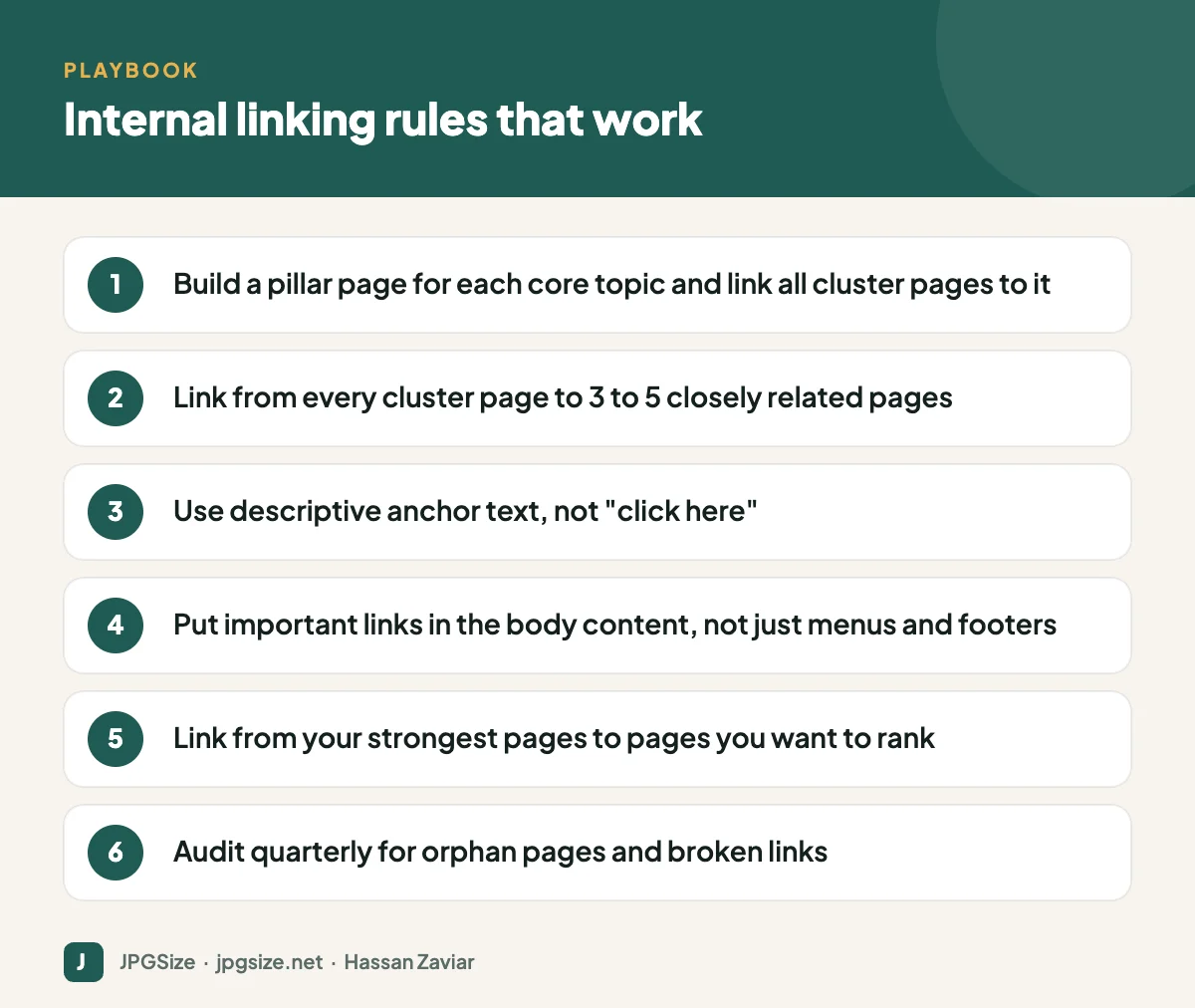
List the three to five core topics your business wants to be known for. Under each, list the questions and subtopics your audience searches for. Our keyword research guide explains how to find them. Each core topic becomes a pillar; each important subtopic becomes a cluster page.
Step 2: Decide which pages matter most
Not all pages are equal. Identify your money pages (services, products, tools, sign-up pages) and the pillar pages that support them. These should receive the most internal links.
Step 3: Link within the content
Contextual links inside paragraphs are the most valuable because they come with meaningful surrounding text. Navigation and footer links help crawlers but carry less context. A practical rule: every new article should include at least three to five contextual internal links, and at least one existing article should be updated to link to it.
Step 4: Write descriptive anchor text
Anchor text should tell the reader and the search engine what they will find. “Read our guide to responsive images” is better than “click here”. Vary anchors naturally; you do not need the exact keyword every time, and over-optimised exact-match anchors on every link look unnatural.
Step 5: Link from strong pages
Check which of your pages already have the most traffic and backlinks (Google Search Console and analytics tools show this). Adding a relevant link from those pages to a newer or weaker page is one of the fastest ways to help it rank.
Step 6: Link to useful tools and conversion pages
If your site has tools, calculators or product pages, link to them where they genuinely help. For example, an article about reducing file size naturally links to a tool that reduces image size in KB. This helps users and passes authority to pages that serve your business goals.
How many internal links per page?
There is no fixed limit. Google can crawl many links on a page, but each link’s value is shared among all links, and too many links overwhelm readers. For a 1,000 to 2,000-word article, three to ten contextual internal links is typical. Prioritise relevance over quantity.
Internal linking mistakes to avoid
- Orphan pages with no internal links pointing to them.
- Broken internal links after changing URLs; always set up redirects and update links.
- Linking the same anchor text to different pages, which confuses what each page is about.
- Links hidden in JavaScript that crawlers cannot follow; use normal a elements with href attributes.
- Automatically inserted keyword links on every mention, which looks spammy and distracts readers.
- Nofollow on internal links, which wastes the signal. Keep internal links followed.
How to audit your internal links
- Crawl your site with a tool such as Screaming Frog or your SEO suite’s site audit. Export pages with zero or very few incoming internal links.
- Check Search Console’s Links report to see your most linked-to pages; make sure they are the ones you care about.
- Use your SEO plugin. Rank Math, for example, shows internal and external link counts for every post in the WordPress posts list.
- Fix broken links and redirect chains.
- Add links to orphan pages from relevant cluster pages and the pillar.
Repeat the audit every quarter, or after publishing a batch of new content.
An example cluster from this site
Our SEO content is organised in exactly this way. The image SEO guide is the pillar. It links to detailed cluster articles on Core Web Vitals and images, responsive images, image structured data and visual search. Each of those links back to the pillar and across to closely related articles, and they link out to relevant tools such as the JPG compressor where a reader is likely to need one.
When we publish a new image SEO article, we add it to the pillar page and to at least two related cluster articles on the same day, so it never starts life as an orphan.
Frequently asked questions
What is a good internal linking strategy?
Organise content into topic clusters with pillar pages, link every cluster page to its pillar and to related pages with descriptive anchor text, and make sure important pages receive links from your strongest content.
How many internal links should a blog post have?
Typically three to ten contextual internal links for a standard article. Relevance matters more than the number.
Do internal links help SEO?
Yes. They help Google discover pages, understand what they are about and judge their relative importance within your site.
Should internal links open in a new tab?
Generally no. Internal links should open in the same tab so the reader’s browsing is not disrupted. New tabs are more appropriate for downloads or external references.
Sources and further reading
About the author: Hassan Zaviar writes about image optimization, SEO, AI and digital marketing for JPGSize and works on the site’s free browser-based image tools. Last reviewed: 24 September 2026. Spotted something out of date? Tell us and we will update it.

