
Images can bring traffic from Google Images, Google Lens, Discover and AI-generated answers, but only if search engines can find them, understand them and load them quickly. This guide covers each of those three jobs in order.
Quick answer: Image SEO means making images discoverable (a real img element, crawlable URL, image sitemap), understandable (descriptive file name, alt text, surrounding text, structured data) and fast (right dimensions, modern format, compression, lazy loading below the fold). Get those three right and your images can rank on their own and help the page they sit on.
What image SEO actually is
Image SEO is the practice of optimizing images so that search engines can index them and show them to people who are looking for them. It is not a separate discipline from normal SEO. Google says it uses the alt text, computer vision and the content of the surrounding page to understand what an image shows, so a great image on a thin page will still struggle.
It helps to think of it as three separate problems:
- Discovery: Can a crawler find the image file at all?
- Understanding: Once found, can it tell what the image is about and which searches it answers?
- Performance: Does the image load fast enough that it does not hurt the page’s Core Web Vitals and user experience?
Most sites get one of these right and ignore the other two. The rest of this guide goes through each.
Step 1: Make images discoverable
Use HTML image elements
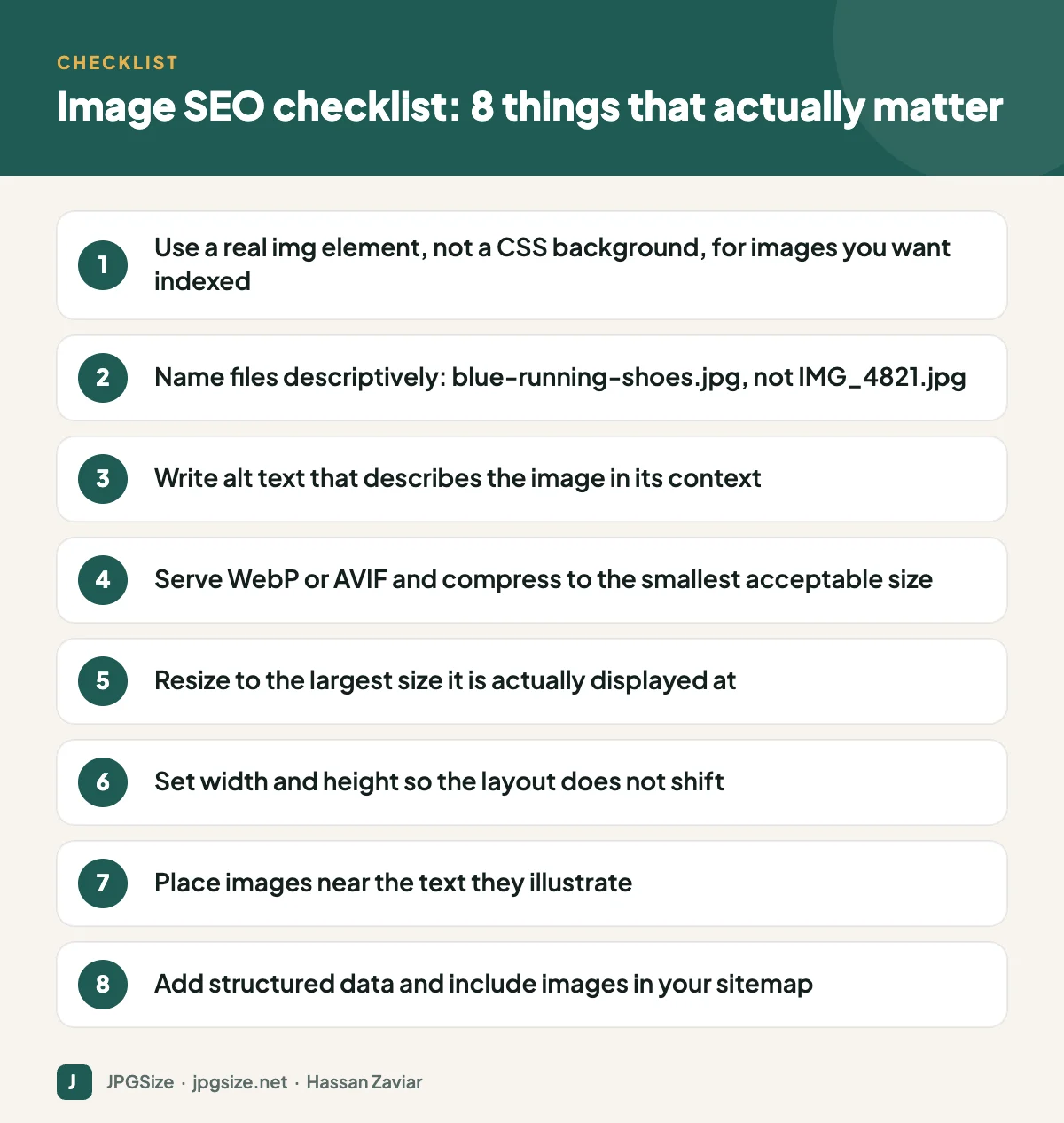
Google indexes images placed with the HTML img element (and picture element). It does not index images added only as CSS background images. If an image carries meaning, such as a product photo, a chart or a diagram, put it in the HTML. Decorative textures can stay in CSS.
Keep image URLs stable and crawlable
Do not block your image folders in robots.txt, and avoid changing image URLs every time you redeploy. Google recrawls images less often than pages, so a changing URL can mean the image falls out of the index for a while.
Include images in your sitemap
If you already have an XML sitemap, you can add image entries to each page’s URL. This is especially useful for images loaded by JavaScript, such as galleries or sliders, which crawlers may otherwise miss. WordPress SEO plugins such as Rank Math add images to sitemaps automatically.
Step 2: Help search engines understand each image
File names
A file name is a small but real signal. red-leather-office-chair.jpg tells Google far more than DSC_0092.jpg. Use lowercase words separated by hyphens and describe the subject. We cover the details in our guide to SEO-friendly image file names.
Alt text
Alt text exists first for people who use screen readers, and second for search engines. Good alt text describes what is in the image in the context of the page, in one sentence, without keyword stuffing. Our separate guide on how to write alt text includes examples for products, charts, logos and decorative images.
Surrounding content
Place images next to the text that explains them. A caption is one of the most-read pieces of text on any page, so use it when it adds information. The page title and headings also influence which searches an image can appear for.
Structured data
Product, Recipe, Article and other schema types let you specify an image explicitly, which can make your images eligible for rich results and help AI search features pick the right picture. See structured data for images for working examples.
Step 3: Make images fast
Images are usually the heaviest resources on a page, and the hero image is very often the Largest Contentful Paint element. Speed matters for rankings through Core Web Vitals and, more importantly, for whether visitors stay.
Resize to the display size
A 4000-pixel-wide phone photo shown in an 800-pixel column wastes most of its bytes. Resize to roughly the largest size the image is displayed at (twice that for sharp results on high-density screens). Our resize image in pixels tool does this in the browser without uploading anything.
Choose a modern format
WebP and AVIF produce much smaller files than JPEG at similar quality, and both are supported by every current major browser. In our own test on a standard 512 x 512 photo, JPEG at quality 80 was 43.3 KB, WebP at quality 80 was 31.0 KB and AVIF at quality 60 was 21.6 KB, with very similar measured quality. The full comparison is in WebP vs AVIF vs JPEG.
Compress sensibly
Compression is a trade between bytes and visible quality. For most content photos, a target between 60 KB and 200 KB is realistic. Use our JPG compressor or read how to reduce image size in KB without losing quality.
Serve responsive images and reserve space
Use srcset and sizes so phones download smaller files than desktops, and always set width and height attributes so the browser can reserve space and avoid layout shift. See responsive images with srcset and Core Web Vitals and images.
Lazy load below the fold only
Native lazy loading (loading=”lazy”) is great for images further down the page, but it should never be used on the hero image. Our guide to lazy loading and SEO explains why.
Image SEO for AI search and visual search
Google Lens, AI Overviews and chat-based search engines all rely on the same signals: clear subject matter, descriptive text around the image, and structured data. Original images tend to do better than stock photos that appear on thousands of other sites, because they give a search engine a reason to show your page instead of someone else’s. If visual discovery matters for your business, read visual search SEO for Google Lens and generative engine optimization.
Common image SEO mistakes
- Uploading full-resolution camera files straight into the CMS.
- Using the same generic alt text, such as “image” or the page title, on every image.
- Putting important text inside images where search engines and screen readers cannot read it.
- Lazy loading the first visible image and slowing down LCP.
- Hosting images on a different domain that blocks crawlers.
- Forgetting the Open Graph image, so shared links look broken on social media. Our Open Graph image guide fixes this.
Frequently asked questions
Does alt text help SEO?
Yes. Alt text is one of the main signals Google uses to understand an image, and it is essential for accessibility. Write it to describe the image for someone who cannot see it, and relevant keywords will usually appear naturally.
What is the best image size for SEO?
There is no single number. Resize images to the largest size they are displayed at, and compress them so most content images land somewhere between 60 KB and 200 KB. Hero images deserve extra care because they often determine Largest Contentful Paint.
Should I use WebP or JPEG for SEO?
Use WebP or AVIF where your platform supports them, because they are smaller at the same quality. JPEG is still a safe fallback and is required by some upload forms and older systems.
Do image file names matter for SEO?
They are a minor signal, but they cost nothing to get right. Use short, descriptive, hyphenated names that describe the subject of the image.
Sources and further reading
- Google Search Central: Image SEO best practices
- Google Search Central: Image sitemaps
- web.dev: Largest Contentful Paint
- W3C WAI: Images tutorial
About the author: Hassan Zaviar writes about image optimization, SEO, AI and digital marketing for JPGSize and works on the site’s free browser-based image tools. Last reviewed: 24 September 2026. Spotted something out of date? Tell us and we will update it.

