
JPEG has been the default photo format for over thirty years. WebP and AVIF can produce the same visual quality in noticeably fewer bytes, and all current major browsers support both. So why is JPEG still everywhere, and when should you switch?
Quick answer: For photos on websites, use AVIF or WebP; in our test they were roughly 20 to 50% smaller than JPEG at similar quality. Keep JPEG for application forms, email and anywhere compatibility matters more than bytes. Use PNG, lossless WebP or SVG for logos, screenshots and graphics with sharp edges.
The three formats at a glance
| JPEG | WebP | AVIF | |
|---|---|---|---|
| Released | 1992 | 2010 (Google) | 2019 (Alliance for Open Media) |
| Compression | Lossy | Lossy and lossless | Lossy and lossless |
| Transparency | No | Yes | Yes |
| Animation | No | Yes | Yes |
| Browser support | Universal | All current major browsers | All current major browsers |
| Encoding speed | Very fast | Fast | Slower |
| Best for | Compatibility, forms, email | General web images | Smallest web photos |
Our test: same photos, three formats
To see real numbers rather than marketing claims, we encoded three standard test photographs (the “astronaut”, “coffee” and “chelsea” images bundled with the scikit-image library) using Pillow 12.3 with its bundled libjpeg-turbo, libwebp and libavif encoders. We measured file size and PSNR, a common objective quality score where higher means closer to the original.
| Photo | JPEG q80 | WebP q80 | AVIF q60 |
|---|---|---|---|
| Astronaut, 512 x 512 | 43.3 KB (PSNR 34.7) | 31.0 KB (35.6) | 21.6 KB (34.9) |
| Coffee, 600 x 400 | 45.4 KB (33.2) | 37.1 KB (34.5) | 25.7 KB (33.9) |
| Chelsea, 451 x 300 | 22.3 KB (36.7) | 16.6 KB (36.7) | 12.9 KB (36.7) |
What this shows:
- WebP at the same quality setting was 18 to 28% smaller than JPEG while scoring the same or slightly better on PSNR.
- AVIF at quality 60 matched or beat JPEG quality 80 on PSNR while being 42 to 50% smaller.
- The original lossless PNG versions were 214 KB to 431 KB, so any of the lossy formats is a huge saving.
Quality settings are not comparable between formats (WebP 80 is not the same as JPEG 80), and PSNR is only one way to measure quality. Your own images will vary, especially graphics and screenshots, so test with representative files. The broad pattern, AVIF smallest, WebP in the middle and JPEG largest, matches Google’s own published WebP study and what most performance engineers report.
When JPEG is still the right choice
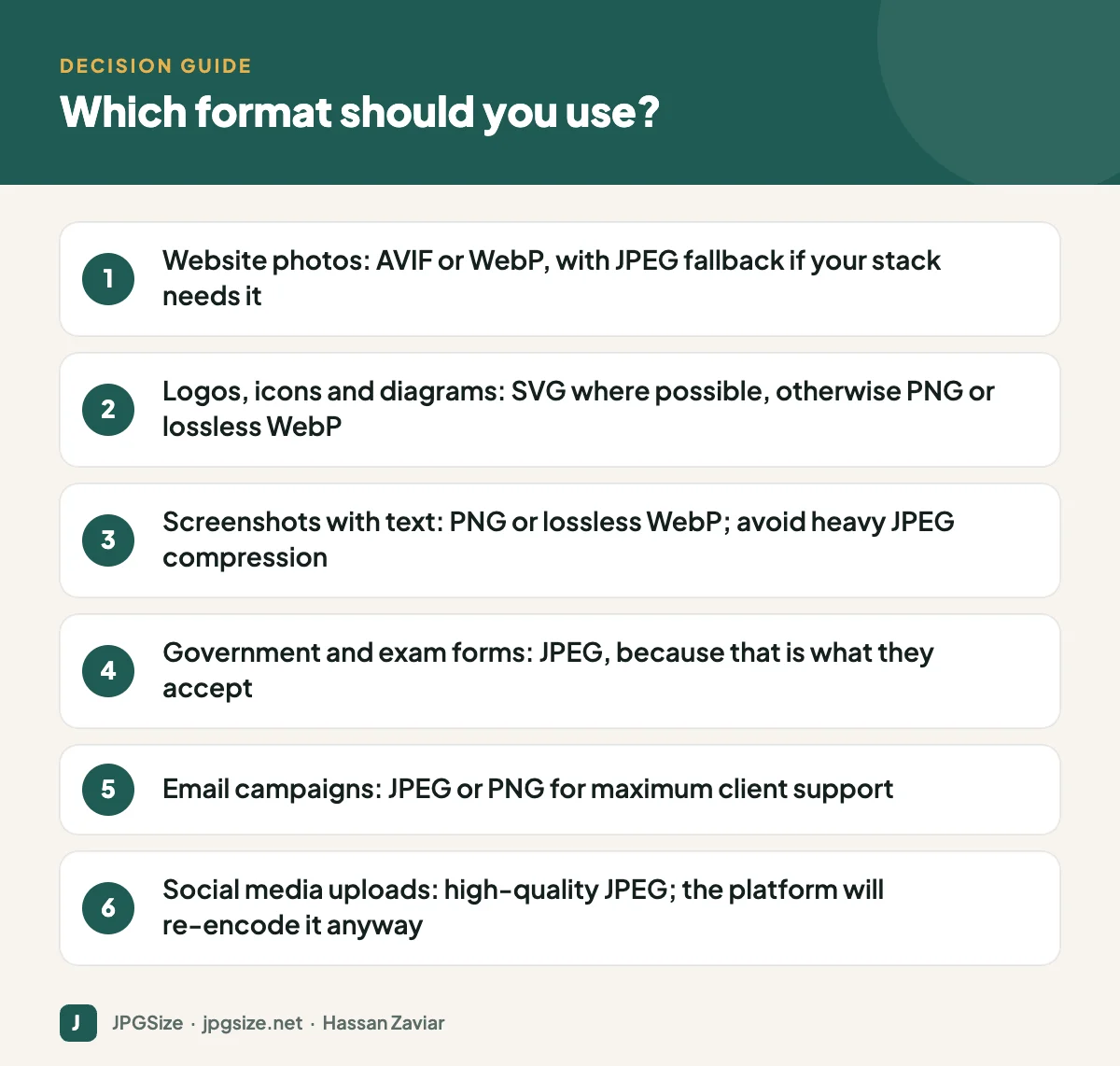
- Application and exam forms. Government portals, university applications and recruitment sites almost always require JPG or JPEG with a size limit in KB. If you need to hit a limit like 20 KB or 50 KB, use our reduce image size in KB or resize to 50KB tools. If a phone gave you a HEIC photo, see converting HEIC to JPG.
- Email. Support for WebP and AVIF across email clients is still inconsistent. JPEG and PNG are safe. See email marketing images.
- Sharing files with people. Everyone can open a JPEG. Many desktop apps still cannot open AVIF.
- Uploads to platforms that re-encode. Social networks convert your upload anyway, so upload a high-quality JPEG and let them do their thing. Our guide to why social media lowers photo quality explains the details.
When to use WebP
WebP is the safe modern default for websites. It supports transparency (so it can replace many PNGs), encodes quickly and is handled by WordPress, most CDNs and most image plugins. Since WordPress 5.8 you can upload WebP images directly to the media library.
When to use AVIF
AVIF gives the smallest files for photographs and handles gradients and skies with fewer banding artefacts than JPEG at low bitrates. The trade-offs are slower encoding and occasional softness in fine detail at aggressive settings. It is ideal for large hero images and photo-heavy pages where every kilobyte affects Largest Contentful Paint. WordPress has supported AVIF uploads since version 6.5, provided your server’s image library supports it.
Serving modern formats with a fallback
If you need to support very old browsers or systems, use the HTML picture element: list an AVIF source, then a WebP source, then a JPEG img as the fallback. The browser picks the first format it supports. Many CDNs and WordPress plugins do this automatically through content negotiation, serving AVIF or WebP to browsers that announce support in their Accept header. Combine this with responsive images so each device gets the right size as well as the right format.
What about PNG, SVG and JPEG XL?
- PNG is lossless and ideal for screenshots, UI images and graphics with text, but it is a poor choice for photos because files are huge.
- SVG is a vector format, perfect for logos and icons because it stays sharp at any size and is often tiny.
- JPEG XL is technically impressive, but browser support is still limited, so it is not yet a practical default for most websites.
How to convert your images to WebP or AVIF
You do not need to convert every image by hand. Choose the approach that fits how your site is built:
- WordPress plugins and hosts. Many image optimisation plugins and managed hosts generate WebP or AVIF copies automatically and serve them to supporting browsers. Check that the originals are kept, so you can change strategy later.
- Image CDNs. Services that resize and transform images on the fly can pick the best format per visitor based on the browser’s Accept header, with no changes to your content.
- Build tools. If you run a static or headless site, image processing libraries such as sharp or Pillow can output AVIF and WebP during the build.
- One-off conversions. For a handful of images, desktop editors and browser-based converters are fine. Always keep a high-quality original, because converting from one lossy format to another loses quality each time.
Whichever route you choose, compare a few converted images side by side with the originals at 100% zoom before rolling out a new setting across the whole site. Faces, text and smooth gradients such as skies are where compression problems show up first.
A simple rule of thumb
If you only remember one thing: JPEG for compatibility, WebP for convenience, AVIF for the smallest files. Then size every image to the space it is shown in, because the wrong dimensions waste far more bytes than the wrong format.
Frequently asked questions
Is WebP better than JPEG?
For websites, usually yes: it produces smaller files at similar quality and supports transparency. JPEG is still better for compatibility, such as forms, email and sharing files.
Is AVIF better than WebP?
AVIF typically produces smaller files than WebP for photographs, in our test roughly 17 to 31% smaller at comparable quality. It encodes more slowly and has slightly less tool support, so WebP remains a sensible default if you want simplicity.
Does Google prefer WebP for SEO?
Google does not rank a page higher because of the file format. Smaller images improve page speed and Core Web Vitals, which can help user experience and, indirectly, SEO.
Can I upload WebP to an exam or government form?
Usually not. Most portals only accept JPG or JPEG, and sometimes PDF for documents. Convert with the image to JPG converter and check the size limit.
Sources and further reading
- Google Developers: WebP compression study
- Can I use: AVIF image format
- Can I use: WebP image format
- Google Search Central: Image SEO best practices
About the author: Hassan Zaviar writes about image optimization, SEO, AI and digital marketing for JPGSize and works on the site’s free browser-based image tools. Last reviewed: 24 September 2026. Spotted something out of date? Tell us and we will update it.

