
Camera and phone file names like IMG_4821.JPG or DSC_0092.jpg tell search engines nothing. Renaming images before you upload them is one of the easiest image SEO wins, and it keeps your media library searchable for you too.
Quick answer: Use short, descriptive, lowercase file names with words separated by hyphens, for example blue-trail-running-shoe.jpg. Describe the subject of the image, match the language of the page, avoid keyword stuffing, and rename files before uploading rather than changing the URLs of images that are already indexed.
Do image file names affect SEO?
Yes, but modestly. Google’s image SEO documentation says file names can give it clues about an image’s subject, and recommends short but descriptive names. A file name will not rank an image on its own, but combined with alt text, captions and relevant page content it strengthens the signal. It also appears in the image URL that people see when they open or share the image.
There is a practical benefit as well: in a WordPress media library with thousands of files, “red-leather-office-chair” is searchable, “IMG_4821” is not.
The rules
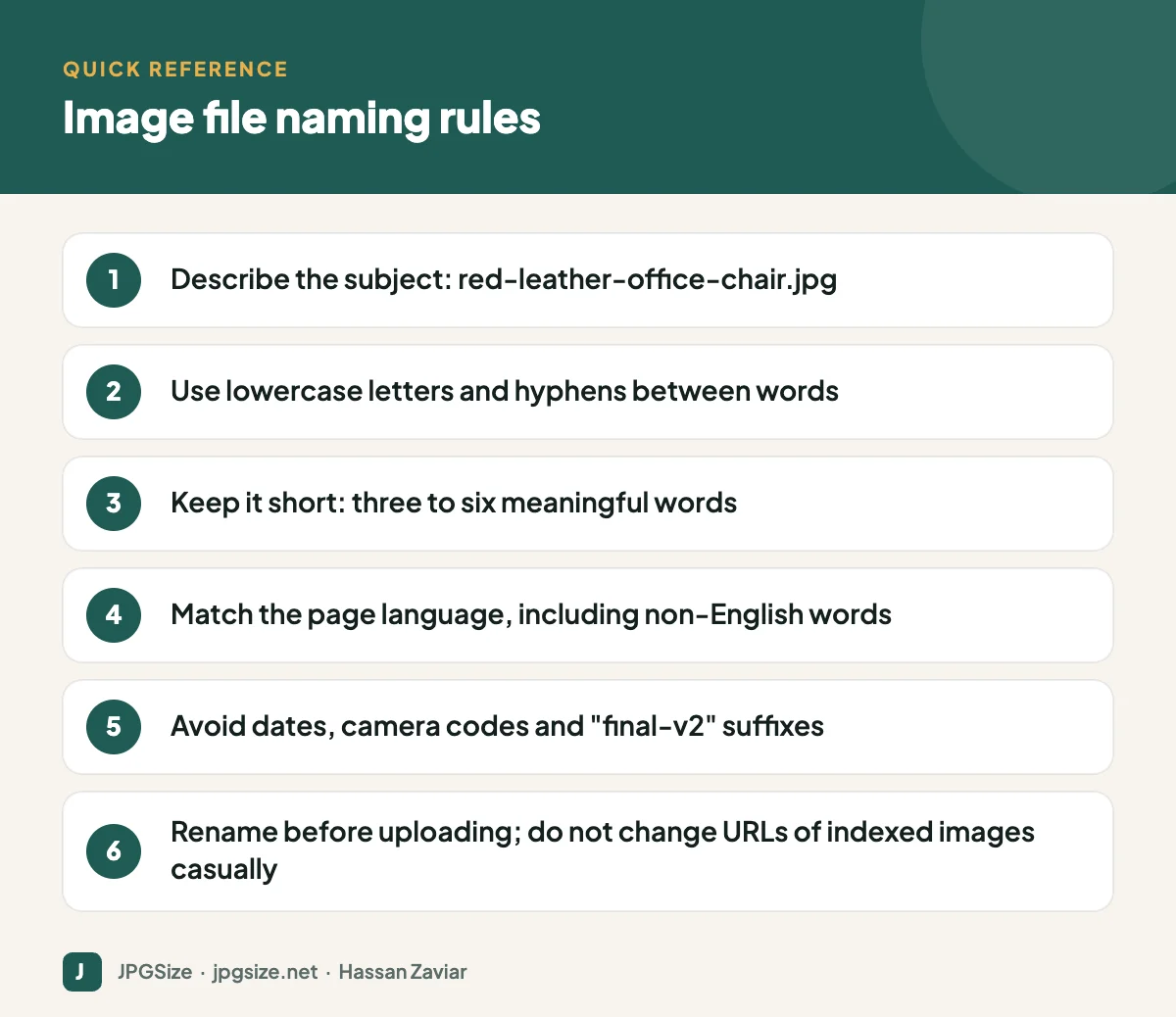
1. Describe the subject
Name the image for what it shows: golden-retriever-puppy-on-grass.jpg, ga4-traffic-acquisition-report.png, passport-photo-white-background.jpg. If the image is a product, include the product name and a distinguishing detail such as colour or angle.
2. Use hyphens, not underscores or spaces
Google recommends hyphens to separate words in URLs. Spaces become %20 in URLs, which looks messy, and underscores are less clearly treated as word separators. Use lowercase letters to avoid duplicate-URL issues on case-sensitive servers.
3. Keep it short
Three to six meaningful words is usually enough. Drop filler words such as “image”, “photo” or “picture”; the file extension already says it is an image.
4. Do not stuff keywords
best-cheap-running-shoes-buy-running-shoes-online.jpg looks spammy and does not help. Pick the words that describe this image.
5. Match the page language
If the page is in Urdu, Hindi or Spanish, a descriptive name in that language (transliterated into Latin characters if your system prefers ASCII) is perfectly fine. Consistency with the page matters more than English.
6. Keep the extension honest
A PNG renamed to .jpg is still a PNG inside, and some upload forms will reject it. If you need a different format, convert it properly with a tool like our image to JPG converter.
Good and bad examples
| Bad | Good | Why |
|---|---|---|
| IMG_4821.JPG | red-leather-office-chair.jpg | Describes the subject |
| Screenshot 2026-09-12 at 10.14.33.png | rank-math-seo-title-settings.png | Names what the screenshot shows |
| final_FINAL_v3.jpg | team-at-annual-meetup-2026.jpg | Meaningful, no version clutter |
| chair.jpg | ergonomic-mesh-chair-side-view.jpg | Specific enough to distinguish from other chair photos |
| shoes-shoes-best-shoes-cheap.jpg | womens-trail-running-shoe-blue.jpg | Descriptive, not stuffed |
Image URLs and folder structure
The full image URL matters a little too. A clean path like /images/products/red-leather-office-chair.jpg is fine; WordPress’s default /wp-content/uploads/2026/09/ structure is also fine. What matters more is that URLs are stable. Google recrawls images less frequently than web pages, so if you change an image URL, the old one can drop out of Google Images before the new one is picked up.
If you use a CDN, make sure the image URLs are on a domain that is not blocked by robots.txt and, ideally, that they stay the same across deploys.
Renaming images already on your site
For images that are already indexed and bringing traffic, leave them alone unless the name is truly meaningless. If you do rename them:
- Upload the renamed file or use a rename plugin that updates all references in your content.
- Redirect the old image URL to the new one with a 301 redirect where possible.
- Update your image sitemap (SEO plugins usually do this automatically).
For new uploads, build the habit of renaming before upload. On a phone, most gallery apps let you rename files; on a computer, rename in the file manager or in bulk with a batch rename tool.
A quick workflow before every upload
- Crop and resize the image to the size it will be displayed at, for example with our pixel resizer.
- Compress it to a sensible file size with the JPG compressor.
- Rename it with a descriptive, hyphenated name.
- Upload it and write alt text in context.
That routine takes under a minute and covers the fundamentals from our image SEO guide.
Naming conventions by image type
Different kinds of images benefit from slightly different naming patterns. A consistent convention also makes your media library easier to manage as it grows.
- Product photos: brand, product, variant and angle, for example acme-ergonomic-chair-black-front.jpg. Keep the same pattern across every product so images for one item sort together.
- Blog illustrations and hero images: the topic of the article plus what the image shows, for example image-seo-checklist-infographic.webp.
- Screenshots: the tool and the screen, for example ga4-engagement-report.png. Screenshots are often the images people search for when they need step-by-step help.
- Social graphics and Open Graph images: the campaign or article name, for example summer-sale-2026-instagram-portrait.jpg, so you can find the right version for each platform later.
- Team and location photos: the person or place and the context, for example hassan-zaviar-headshot.jpg or lahore-office-reception.jpg, which also helps with local and brand searches.
File names, AI search and visual search
Google Lens and AI-driven search features identify images mainly by what they see and by the text around them, so a file name will never outweigh the content of the image itself. It is still part of the evidence. When the file name, alt text, caption and surrounding paragraph all describe the same thing, a search engine can be more confident about what the image shows and which queries it answers. Conflicting signals, such as a file called cheap-flights.jpg on a photo of a cat, make that job harder. For more on this, see our guides to visual search SEO and generative engine optimization.
Frequently asked questions
Should I use hyphens or underscores in image file names?
Use hyphens. Google recommends hyphens to separate words in URLs, and they are the widely accepted convention.
Does renaming an image change its SEO?
Renaming creates a new URL. Google has to discover and index the new file, so rankings for that image can reset temporarily. Rename new uploads freely, but be cautious with images that already get traffic.
Can I use capital letters in image names?
It is better not to. Some servers treat Photo.jpg and photo.jpg as different files, which can create broken links and duplicate URLs.
Is the file name more important than alt text?
No. Alt text is the stronger and more important signal, and it also serves accessibility. Treat the file name as a helpful extra.
Sources and further reading
About the author: Hassan Zaviar writes about image optimization, SEO, AI and digital marketing for JPGSize and works on the site’s free browser-based image tools. Last reviewed: 24 September 2026. Spotted something out of date? Tell us and we will update it.

