
Search engines are good at understanding images, but structured data removes the guesswork. It tells them which image represents a product, which picture should appear for an article, who created an image and how it can be licensed. It is also one of the cleaner signals AI search systems can use when choosing what to show.
Quick answer: Add image information to the structured data you already use: the image property in Article, Product, Recipe and similar schema types, the logo property for Organization, and ImageObject with license and acquireLicensePage for images you license. Use JSON-LD, point to crawlable image URLs, and only mark up images that are visible on the page.
What structured data does for images
Structured data is code, usually JSON-LD placed in the page, that describes the page’s content using the schema.org vocabulary. For images it can:
- Make a page eligible for rich results that show images, such as product snippets, recipe cards and article carousels in Top Stories and Discover.
- Tell Google which image to use as the representative image for a page.
- Show a “Licensable” badge in Google Images with a link to how to license the image.
- Help AI features and visual search associate your image with the right product, brand or topic.
Structured data does not guarantee a rich result; it makes you eligible. Google’s general structured data guidelines still apply, including accurate, visible content.
The main schema types that use images
Article and BlogPosting
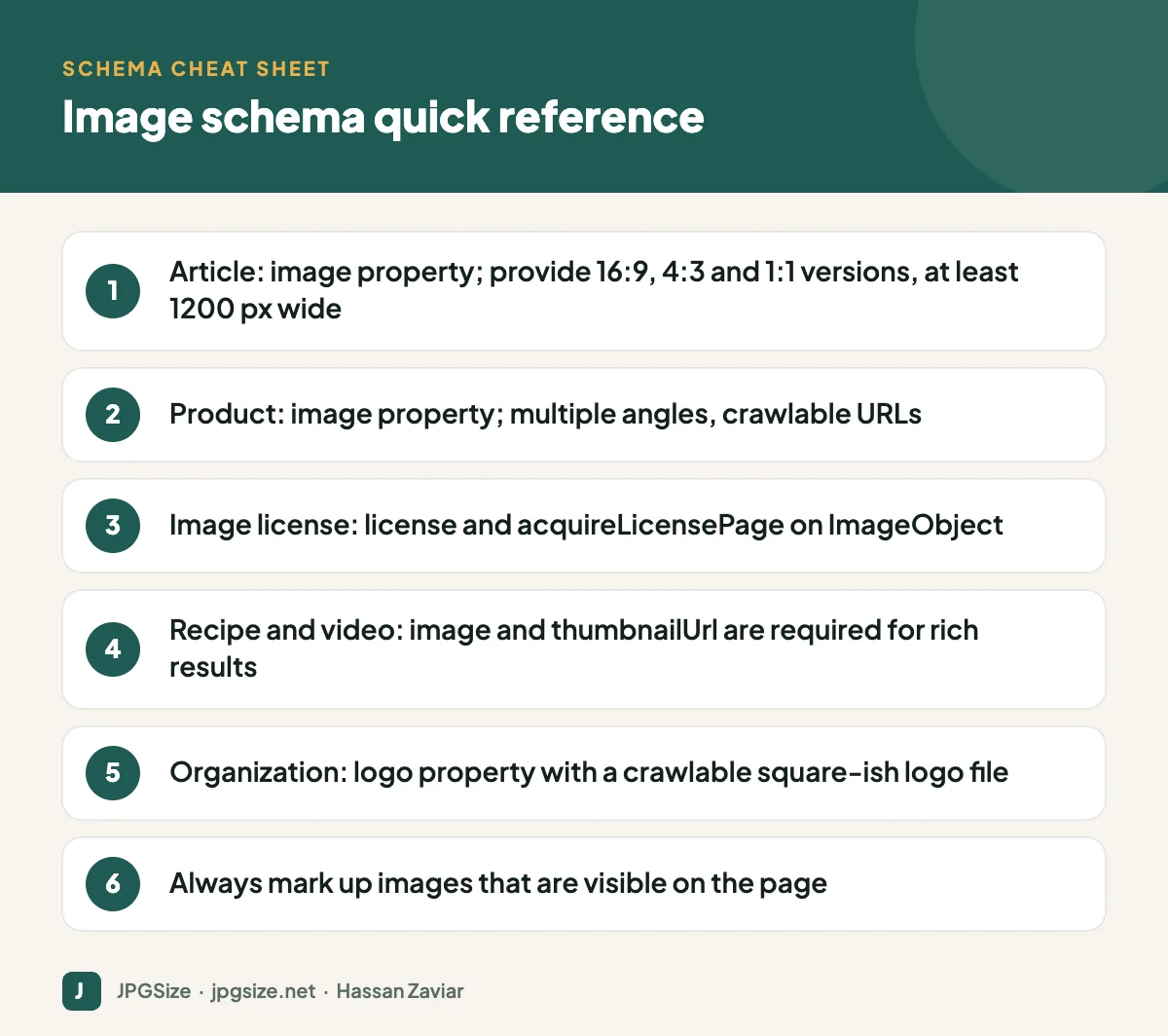
For articles, the image property should reference one or more images on the page. Google recommends high-resolution images at least 1200 pixels wide, and supplying several aspect ratios (16:9, 4:3 and 1:1) so the image looks good in different result layouts. WordPress SEO plugins such as Rank Math generate Article schema automatically and use the featured image, so setting a good featured image matters.
Product
Product schema should include image URLs for the product, ideally multiple angles. Merchants who also use Google Merchant Center should keep the images consistent between the feed and the page. Product image quality affects click-through from both organic results and Shopping surfaces; see product image optimization.
Recipe, video and other rich result types
Many rich results require an image. Recipes need an image; VideoObject needs a thumbnailUrl. If the required image is missing, the page is not eligible for that rich result, no matter how good the rest of the markup is.
Organization and logo
The logo property on Organization schema tells Google which image to use as your logo in search features and knowledge panels. Use a crawlable file with a solid or transparent background and a shape that works at small sizes.
ImageObject and image license metadata
If you create images that others might want to use, such as photography, illustrations or infographics, image license metadata can add a “Licensable” badge in Google Images. You can supply it with structured data on the page where the image appears, or with IPTC photo metadata embedded in the image file.
The key properties are:
- contentUrl: the URL of the image file.
- license: a URL to the license terms, such as a Creative Commons licence or your own terms page.
- acquireLicensePage: a URL where people can learn how to license the image.
- creditText, creator and copyrightNotice: who should be credited.
A minimal ImageObject in JSON-LD would contain the @context of https://schema.org, an @type of ImageObject, and those properties. Place it in a script element of type application/ld+json, or use a plugin that supports custom schema.
Best practices for image schema
- Use JSON-LD. Google recommends it because it is easy to maintain separately from the HTML.
- Point to crawlable URLs. Do not block the image folder in robots.txt, and use absolute URLs.
- Match the page. Only mark up images that users can see. Hidden or unrelated images can make the markup ineligible or be treated as spam.
- Provide good images. High resolution, correct aspect ratio and a clear subject. Resize and compress with tools like our pixel resizer and JPG compressor without going below the recommended widths.
- Keep social tags aligned. Open Graph and Twitter Card images are not schema.org, but they should usually use the same hero image. See our Open Graph image guide.
How to test your markup
- Rich Results Test: shows which rich result types a page is eligible for and flags errors and warnings.
- Schema Markup Validator: validates general schema.org syntax, including types Google does not use for rich results.
- Search Console enhancement reports: after Google has crawled your pages, reports such as Products and Image metadata show valid and invalid items across the site.
Where structured data fits in image SEO
Structured data is the final layer on top of the basics. Images still need descriptive file names, good alt text, relevant surrounding content and fast loading. For the complete picture, read our image SEO guide, and for how structured data supports AI answers, see answer engine optimization.
Common image schema errors and how to fix them
| Error or warning | What it usually means | Fix |
|---|---|---|
| Missing field “image” | The schema type requires an image and none was provided | Set a featured image or add the image property manually |
| Invalid URL in field “image” | Relative URL, typo, or an image blocked by robots.txt | Use an absolute, crawlable URL |
| Image too small | Below the recommended width for that feature | Upload a larger original, at least 1200 px wide for articles |
| Unparsable structured data | Broken JSON, such as a missing comma or quote | Validate the JSON-LD and regenerate it |
| Image not visible on page | Markup references an image users cannot see | Mark up only visible images |
Most WordPress sites only need to get two things right: a high-quality featured image on every post, and an SEO plugin configured to output Article or Product schema. The advanced ImageObject work is worth it mainly for photographers, illustrators and publishers who license their images.
Frequently asked questions
Do I need ImageObject schema for every image?
No. Most images are covered by the image property of the page’s main schema type, such as Article or Product. Use standalone ImageObject markup mainly for license metadata or image-focused pages.
What size should the Article schema image be?
Google recommends images at least 1200 pixels wide, and providing versions in 16:9, 4:3 and 1:1 aspect ratios.
Does image schema improve rankings?
It does not directly boost rankings, but it can make pages eligible for rich results and image features that improve visibility and click-through rate.
Can I use Rank Math for image schema?
Yes. Rank Math adds the featured image to Article schema automatically and supports Product and other schema types. Check the output with the Rich Results Test.
Sources and further reading
- Google Search Central: Image license metadata
- Google Search Central: Article structured data
- Google Search Central: Product structured data
- Schema.org: ImageObject
About the author: Hassan Zaviar writes about image optimization, SEO, AI and digital marketing for JPGSize and works on the site’s free browser-based image tools. Last reviewed: 24 September 2026. Spotted something out of date? Tell us and we will update it.

