
Alt text is a short written description of an image. Screen readers read it aloud, browsers show it when an image fails to load, and search engines use it to understand what a picture shows. Writing it well takes about ten seconds per image once you know the rules.
Quick answer: Write alt text as one plain sentence that describes what the image shows and why it is on the page. Be specific (the product, colour, action or data point), skip phrases like “image of”, keep it under roughly 125 characters, and use an empty alt attribute for purely decorative images.
Why alt text matters
Alt text does three jobs at once:
- Accessibility. People using screen readers rely on it to understand images. The Web Content Accessibility Guidelines (WCAG) require a text alternative for every non-text element that conveys information.
- Search. Google’s image SEO guidance says it uses alt text, together with computer vision and the page content, to understand images. It is one of the clearest signals you control.
- Resilience. When an image fails to load on a slow connection, the alt text is displayed instead, so the reader still gets the point.
Alt text is part of a bigger picture. If you are working on image rankings overall, start with our complete image SEO guide.
The alt text formula
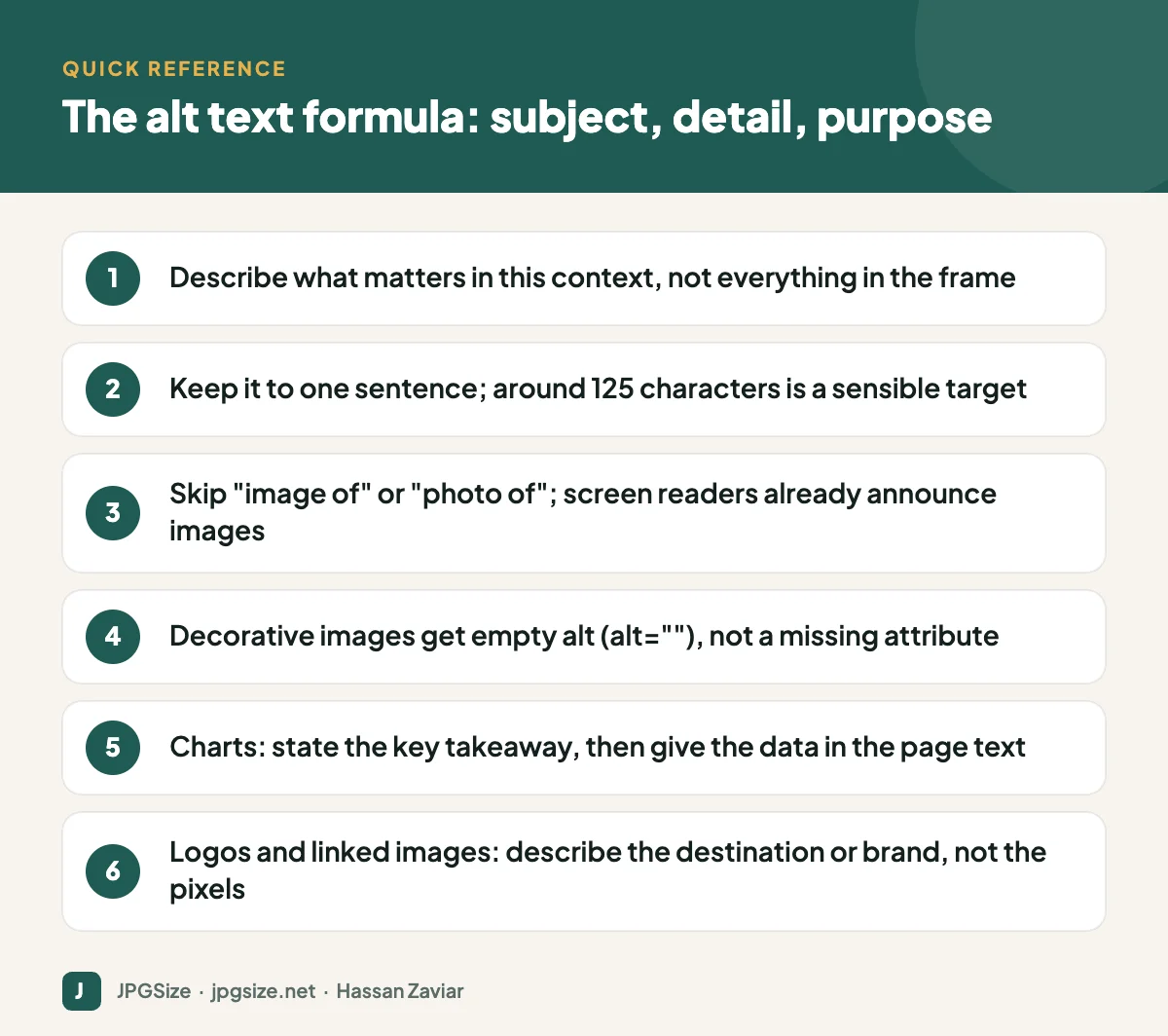
A reliable pattern is subject + relevant detail + purpose. Ask yourself: if I described this image to someone over the phone, in the context of this exact page, what would I say?
| Image | Weak alt text | Better alt text |
|---|---|---|
| Product photo | shoe | Blue women’s trail running shoe with a grey rubber sole, side view |
| Team photo | team | Five members of the customer support team standing outside the office entrance |
| Chart | chart | Bar chart showing WebP files about 28% smaller than JPEG at similar quality |
| Logo in header link | logo | JPGSize home |
| Screenshot | screenshot | Upload form showing the error “File size must be under 50 KB” |
Notice that the better versions are specific, but none of them are long. They describe what matters for the page, not every pixel.
Context changes the correct alt text
The same photo can need different alt text on different pages. A photo of a chef plating a dish might be described as “Chef garnishing grilled salmon with fresh dill” on a recipe page, but as “Head chef Amina Rauf in the restaurant kitchen” on an about page. The image has not changed; its purpose has.
Special cases
Decorative images
If an image adds nothing a reader would miss, such as a background swirl, a divider or an icon next to text that already says the same thing, give it an empty alt attribute (alt=””). Do not leave the attribute out entirely, because some screen readers will then read the file name aloud.
Images of text
Avoid putting important text in images. If you must (a quote graphic, a poster, a certificate), the alt text should contain the same words as the image.
Charts, graphs and infographics
Use the alt text for the main takeaway (“Line chart showing organic traffic doubling between January and June”) and put the detailed numbers in the page text, a table or a caption. Long descriptions do not belong in alt attributes.
Linked images
When an image is the only content of a link, its alt text becomes the link text. Describe where the link goes: “Download the image SEO checklist”, not “arrow icon”.
Logos
In a header, alt text is usually just the brand name, or “[Brand] home” if it links to the homepage. In a “featured in” strip, the publication name is enough.
Common alt text mistakes
- Keyword stuffing. “SEO image SEO alt text SEO tips best SEO” helps no one and can be treated as spam.
- Repeating the caption word for word. Screen reader users will hear the same text twice. Let the alt text describe the image and the caption add context.
- Starting with “image of”. Screen readers already announce that it is an image.
- Using the file name. IMG_2041.jpg is not a description. Rename files properly too; see SEO-friendly image file names.
- Writing a paragraph. If you need more than a sentence, the information belongs in the body text.
Should you use AI to write alt text?
AI tools can produce a reasonable first draft, especially for large product catalogues, but they describe what they see, not why the image is on the page. They also misidentify people, brands and small details. Use them for drafts and review every result. We tested the trade-offs in AI alt text generators.
How to add alt text in WordPress
- Open the post, click the image block and look for the Alternative text field in the block settings sidebar.
- For images already in the Media Library, go to Media, open the image and fill in Alternative Text. Note that this sets the default for future insertions; images already placed in posts keep their own alt text.
- Plugins such as Rank Math can add alt text automatically from file names, but treat that as a fallback, not a strategy.
An alt text checklist for content teams
If several people publish on your site, a short shared checklist keeps quality consistent:
- Does every informative image have alt text that describes it in the context of this page?
- Are decorative images marked with empty alt text?
- Does linked image alt text describe the link destination?
- Are charts summarised in alt text and explained fully in the text?
- Is any text inside images repeated in the alt text?
- Have AI-generated suggestions been reviewed by a person?
Add the checklist to your publishing workflow or editorial guidelines, and spot-check a few older posts each month. Accessibility improvements to existing content count just as much as getting new posts right.
Frequently asked questions
How long should alt text be?
Aim for one sentence, usually under about 125 characters. There is no strict limit, but some assistive technologies handle long alt text poorly, and longer descriptions belong in the page content.
Does alt text help SEO rankings?
It helps Google understand the image, which matters for Google Images and visual search, and it adds relevant context to the page. It is not a trick to rank a page for unrelated keywords.
Should every image have alt text?
Every img element should have an alt attribute. Informative images need descriptive text; decorative images should have an empty alt attribute so screen readers skip them.
Is alt text the same as a title attribute?
No. The title attribute shows a tooltip on hover and is not reliably read by screen readers. Alt text is the accessible description that matters.
Sources and further reading
- W3C WAI: An alt decision tree
- W3C WAI: Images tutorial
- Google Search Central: Image SEO best practices
About the author: Hassan Zaviar writes about image optimization, SEO, AI and digital marketing for JPGSize and works on the site’s free browser-based image tools. Last reviewed: 24 September 2026. Spotted something out of date? Tell us and we will update it.

