
Generative AI is software that creates new content, such as text, images, audio, video and code, from a prompt. For marketers it has gone from novelty to everyday tool in a few years. The challenge is no longer access; it is knowing where it genuinely saves time and improves results, and where it quietly creates risk.
Quick answer: Generative AI uses models trained on huge amounts of data to predict and produce new content in response to instructions. Marketers get the most value using it for drafting, repurposing, visual production, research summaries, personalisation and data analysis, always with human review for accuracy, brand voice, legal issues and originality.
How generative AI works, without the jargon
Most text tools are built on large language models (LLMs). During training, a model reads an enormous amount of text and learns statistical patterns: which words, facts and structures tend to follow others. When you give it a prompt, it predicts a plausible continuation, one small piece of text at a time. It does not look up an answer in a database unless the product connects it to search or your own documents.
Image generators typically use diffusion models. They learn to turn random noise into an image step by step, guided by the text description. That is why they are good at style and composition but historically weaker at exact details like hands, text and logos.
Two practical consequences follow:
- Output is plausible, not guaranteed true. Models can “hallucinate” confident but wrong facts, quotes and statistics.
- Output reflects the prompt and the context you give. Specific instructions, examples and source material produce far better results. See our prompt engineering guide for marketers.
What generative AI is good at in marketing
Content drafting and repurposing
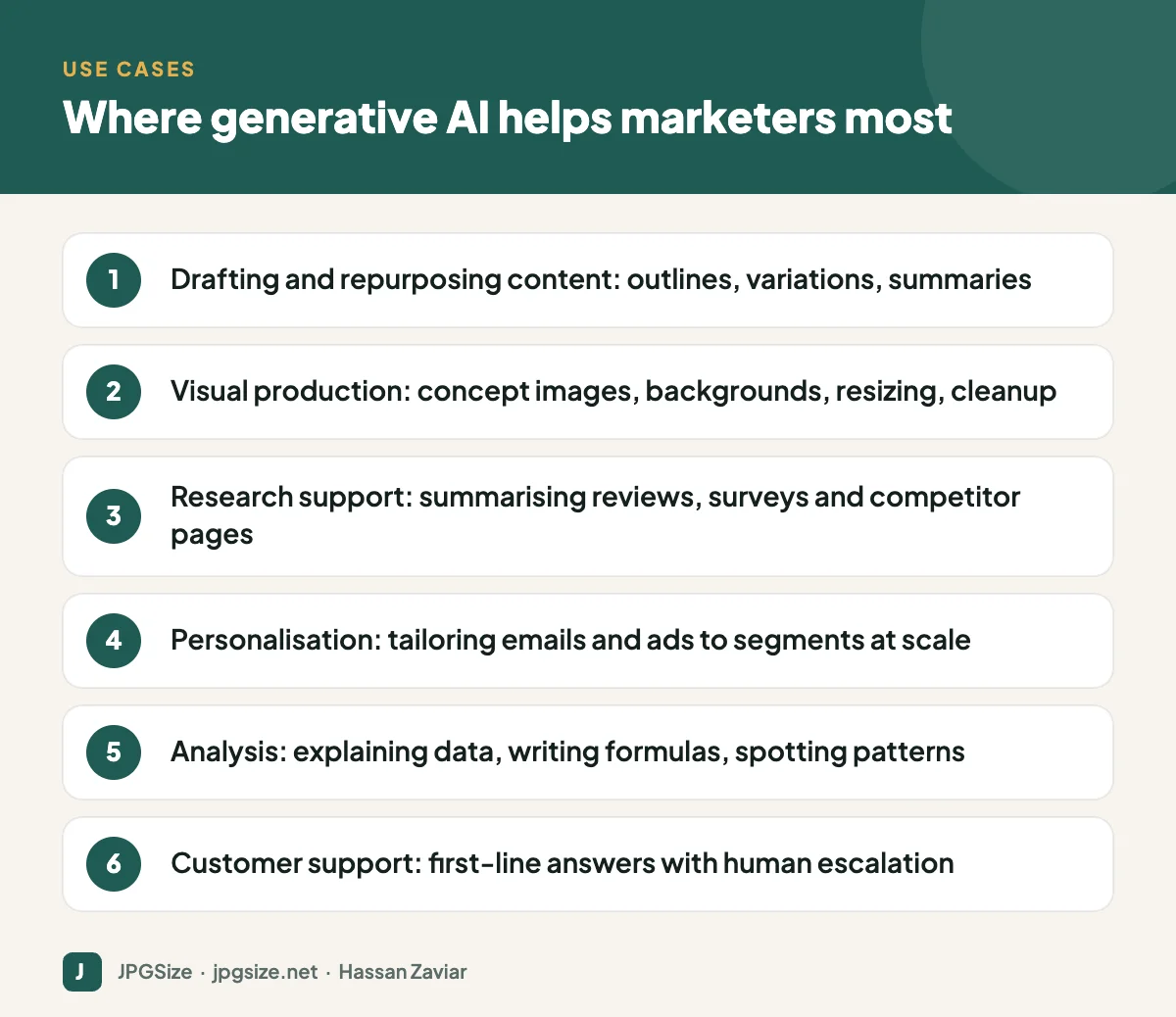
AI is excellent at first drafts, outlines, headline variations, product description templates and turning one asset into many: a webinar into a blog post, a blog post into social captions, a report into an email series. The human job shifts to briefing, editing, fact-checking and adding original insight. If you publish for search, read how to use AI for SEO content without hurting rankings.
Visual production
Image models can create concept art, backgrounds, product scenes and ad variations in minutes. Related AI tools can remove backgrounds, upscale low-resolution images and extend images to new aspect ratios for different social media sizes. Choosing the right tool matters; see how to choose an AI image generator.
Research and analysis
Summarising hundreds of customer reviews, clustering survey responses, explaining an analytics report or writing spreadsheet formulas are all tasks where AI saves hours. Always check numbers against the source.
Personalisation and automation
AI can adapt messages to different segments, languages and stages of the funnel, and it increasingly powers workflows that run with little manual effort. See AI marketing automation and AI agents in marketing.
Customer conversations
Chatbots built on LLMs can answer common questions around the clock, as long as they are grounded in your real policies and hand over to humans when needed. Our guide to AI chatbots for small business covers setup and pitfalls.
Where generative AI falls short
- Original insight and experience. A model can summarise what is already written; it cannot run your customer interviews or test your product. Content that relies only on AI tends to sound like everyone else’s.
- Accuracy. Facts, statistics, legal claims and specifications must be verified.
- Brand voice and nuance. Out of the box, AI writing is generic. It needs examples and editing to sound like you.
- Rights and compliance. Copyright, privacy and disclosure rules still apply. Read can you use AI-generated images commercially.
- Trust. Audiences and platforms are increasingly alert to AI content. Learn how AI-generated images are detected and labelled.
Risks to manage
| Risk | Example | Mitigation |
|---|---|---|
| Hallucination | Invented statistic in a blog post | Require sources; human fact-check |
| Data leakage | Customer data pasted into a public tool | Use business plans with data controls; set a policy |
| Copyright | Image closely resembling a known work or character | Use tools with clear commercial terms; review outputs |
| Brand damage | Off-tone social reply | Approval workflow; brand voice guide |
| Search penalties | Hundreds of thin AI pages | Publish fewer, better pages with real value |
How to get started: a 4-week plan
- Week 1: Pick two repetitive tasks, such as writing social captions and summarising campaign reports. Measure how long they currently take.
- Week 2: Build prompts and templates with examples of your best work and your brand voice rules.
- Week 3: Run in parallel. Do the tasks with AI assistance and compare time and quality against the old way.
- Week 4: Write a simple policy covering approved tools, what data can be shared, review requirements and disclosure. Then expand to the next task.
Choosing your first generative AI tools
You do not need a large stack. Most small marketing teams get far with three categories:
- A general-purpose AI assistant for writing, research summaries, brainstorming and data questions. Choose a business plan that lets you control whether your data is used for training.
- An image tool inside your design workflow, so generated and edited visuals go straight into your templates and brand kit.
- AI features in tools you already pay for. Email platforms, CRMs, analytics suites and social schedulers increasingly include AI for subject lines, segmentation, summaries and scheduling. These are often the quickest wins because they need no new logins or integrations.
Before buying anything new, list the AI features already included in your current subscriptions. Many teams discover they are paying for capabilities they have never switched on.
Measuring whether AI is worth it
Treat AI adoption like any other marketing investment and measure it. Useful metrics include hours saved per week on specific tasks, output volume (for example, ad variations tested per month), quality measures such as editing time or error rates, and business results such as click-through or conversion rates on AI-assisted versus human-only work. If a use case saves time but lowers quality, adjust the process or drop it; not every task benefits.
Frequently asked questions
What is generative AI in simple terms?
It is AI that creates new content, such as text, images, audio or video, based on patterns it learned from large amounts of existing data and the instructions you give it.
How are marketers using generative AI?
Mostly for drafting and repurposing content, creating and editing images, summarising research, personalising campaigns, analysing data and supporting customer service.
Will generative AI replace marketers?
It is replacing some tasks rather than whole roles. Strategy, customer insight, creative judgment, relationships and accountability remain human work, and marketers who use AI well tend to become more productive.
Is AI-generated content bad for SEO?
Not by itself. Google rewards helpful content regardless of how it is produced, but mass-produced content made mainly to manipulate rankings violates its spam policies.
Sources and further reading
- Google Search Central: Guidance about AI-generated content
- U.S. Copyright Office: Copyright and Artificial Intelligence
- Google Search Central: Spam policies
About the author: Hassan Zaviar writes about image optimization, SEO, AI and digital marketing for JPGSize and works on the site’s free browser-based image tools. Last reviewed: 24 September 2026. Spotted something out of date? Tell us and we will update it.

