
Marketing automation is not new: email sequences and lead scoring have existed for years. What AI adds is the ability to automate tasks that used to need human judgment, such as writing a personalised reply, summarising a report, choosing the best image crop or deciding which segment a lead belongs to. For small teams that can mean doing the work of a much larger department, if you pick the right workflows.
Quick answer: AI marketing automation combines traditional automation (triggers, rules and workflows) with AI models that can write, classify, summarise and personalise. Start with frequent, repetitive workflows that are easy to check, such as lead routing, nurture emails, content repurposing, image resizing and reporting. Keep a human approval step for anything customer-facing until results are proven.
Traditional automation vs AI automation
| Traditional automation | AI-powered automation | |
|---|---|---|
| Logic | Fixed rules: if X, then Y | Rules plus model judgment |
| Content | Pre-written templates | Generated or adapted per person or context |
| Data | Structured fields | Can read unstructured text, images and conversations |
| Setup | Map every branch in advance | Describe the goal and constraints, then test |
| Risk | Predictable | Needs monitoring for errors and tone |
The best systems use both: rules for anything that must be exact (unsubscribes, compliance, pricing) and AI for tasks that benefit from flexibility.
High-value use cases
1. Lead capture, enrichment and routing
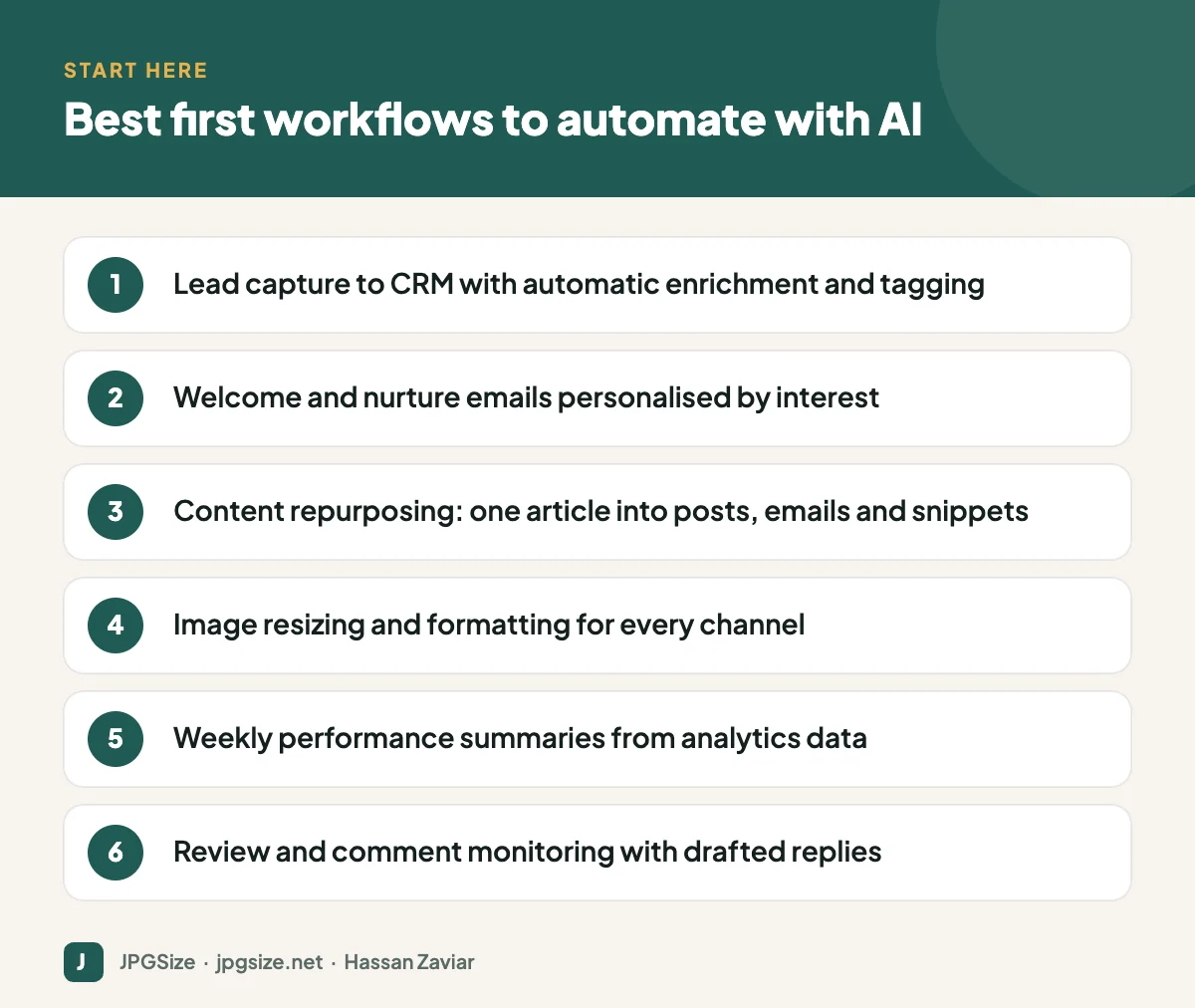
When a form is submitted, AI can classify the enquiry (sales, support, partnership, spam), extract details like company size or product interest from free text, add tags in your CRM and route it to the right person or sequence. This saves time and speeds up response, which matters because leads cool quickly.
2. Personalised nurture emails
Instead of one welcome sequence for everyone, AI can adapt copy to the lead’s industry, stated problem or the content they downloaded, within guardrails you define. Keep the structure and offers fixed; let AI personalise the opening, examples and recommendations. If your emails include images, keep them light; see email marketing images.
3. Content repurposing
One well-researched article can become LinkedIn posts, an email newsletter section, short video scripts, FAQs and ad variations. An automated workflow can create drafts in each format whenever a new article is published, ready for an editor to approve. Plan the calendar with our social media content calendar guide.
4. Visual asset production
Every campaign needs the same image in many shapes and sizes. Automated pipelines can resize, crop, compress and convert images for each platform, and AI can extend or reframe images for new aspect ratios. Our social media image sizes cheat sheet lists the targets, and tools like resize image in pixels handle one-off jobs.
5. Reporting and insights
AI can pull numbers from analytics and ad platforms, write a plain-English summary of what changed and why it might matter, and flag anomalies. It will not replace analysis, but it removes the hour of copying numbers into slides each week. Make sure the underlying tracking is right; see GA4 for beginners.
6. Social listening and review responses
AI can monitor reviews and mentions, classify sentiment and urgency, and draft replies for a person to approve. Negative reviews should always get human attention.
What you need before automating
- Clean data. AI cannot personalise well from a CRM full of duplicates and empty fields. Tidy the basics first.
- Clear rules and brand guidelines. Voice, banned claims, discount limits, escalation triggers.
- Integration tools. Many teams use workflow platforms such as Zapier, Make or n8n, or the automation built into their CRM and email platform, to connect forms, CRM, email, AI models and chat tools.
- A privacy check. Know what personal data flows into which AI service, and make sure you have a lawful basis and appropriate vendor terms.
- An owner. Someone must monitor each automation and be accountable for it.
A 30-day rollout plan
Week 1: Choose and map
List ten repetitive marketing tasks and estimate hours spent on each. Pick two that are frequent, rules-based and low-risk. Map each step: trigger, data, decision, output, review.
Week 2: Build a pilot
Build the workflow with a human approval step before anything reaches customers. Write the AI instructions like a brief, with examples of good output; see prompt engineering for marketers. Test with 20 to 50 real examples.
Week 3: Run in parallel
Let the automation run alongside the manual process. Compare speed, accuracy and quality. Track every error and adjust instructions or rules.
Week 4: Launch and measure
Switch to the automated version for the tasks that proved reliable, keep review steps where errors are costly, and document the workflow. Set a monthly review to check performance and costs.
Mistakes to avoid
- Automating a broken process. If the manual process is unclear, automation makes the confusion faster.
- Removing humans too early. Keep approval steps until error rates are consistently low.
- Over-personalisation. Messages that reference too much personal data feel intrusive.
- Ignoring costs. Per-task pricing on automation platforms and AI APIs can grow quietly as volume increases.
- Forgetting maintenance. Integrations break when tools update. Set alerts for failed runs.
Where this is heading
Automation is moving from fixed workflows towards AI agents that can plan and execute multi-step tasks, such as researching a list of prospects or setting up a campaign draft. They are promising but still need oversight. Read AI agents in marketing for an honest look at what they can and cannot do today.
How to measure the return on automation
For each automated workflow, record a baseline before launch and compare after a month:
- Time saved: hours per week spent on the task before and after.
- Speed: for example, the time from form submission to first response.
- Quality: error rates, approval edits needed, or customer complaints.
- Outcome: conversion rate of leads, email click rates or content output volume.
- Cost: subscription and usage fees versus the value of time saved.
A workflow that saves three hours a week but causes one embarrassing error a month may not be worth it for customer-facing work, but may be perfect for internal reporting. Judge each workflow on its own numbers rather than automating everything at once.
Frequently asked questions
What is AI marketing automation?
It is the use of AI within marketing workflows to handle tasks that need some judgment, such as writing, classifying, summarising and personalising, alongside traditional rule-based automation.
What should I automate first?
Start with frequent, repetitive tasks where mistakes are easy to catch, such as lead tagging and routing, content repurposing drafts, image resizing and weekly reporting.
Is AI marketing automation expensive?
It can be affordable for small businesses because many email platforms and CRMs include AI features. Costs rise with volume on workflow platforms and AI APIs, so estimate usage before scaling.
Will automation make my marketing feel robotic?
Only if you remove human judgment from customer-facing messages. Keep a clear brand voice, review important messages and use personalisation that genuinely helps the customer.
Sources and further reading
- Google Search Central: Guidance about AI-generated content
- UK ICO: Guidance on AI and data protection
About the author: Hassan Zaviar writes about image optimization, SEO, AI and digital marketing for JPGSize and works on the site’s free browser-based image tools. Last reviewed: 24 September 2026. Spotted something out of date? Tell us and we will update it.

