
Customers expect quick answers at any time of day, and small teams cannot staff a help desk around the clock. AI chatbots can now answer questions in natural language, in several languages, using your own information. They can also invent policies, frustrate customers and slow down your website if set up badly.
Quick answer: An AI chatbot for a small business is worth it when you receive many repetitive questions. Build it on your real FAQs, policies and product information (so it answers from facts rather than guessing), limit what it can promise, always offer a way to reach a human, load it without slowing your site, and review conversations regularly. Costs range from free tiers to a few hundred dollars a month depending on volume and features.
How modern AI chatbots work
Older chatbots followed decision trees: click a button, get a scripted answer. Modern AI chatbots use large language models to understand free-text questions and write answers. The good ones use retrieval-augmented generation: before answering, they search your knowledge base (help articles, FAQs, product pages, policies) and base their reply on what they find. This grounding is what keeps answers accurate and specific to your business.
Many platforms combine both approaches: AI for open questions, fixed flows for actions like booking, order tracking or collecting lead details.
Where chatbots help small businesses
- Answering repetitive questions: opening hours, delivery times, returns, pricing, sizes, availability.
- Qualifying leads: asking a few questions and passing warm leads to sales with context.
- Bookings and appointments through calendar integrations.
- Order status when connected to your e-commerce platform.
- After-hours coverage so enquiries are captured, not lost.
- Multilingual support for customers who prefer another language.
For businesses whose customers mostly message on WhatsApp, the same technology can run on the WhatsApp Business Platform; see our WhatsApp Business marketing guide.
What chatbots cost
Pricing changes often, but the typical structures are:
| Option | Typical cost structure | Best for |
|---|---|---|
| Built into your help desk, CRM or website builder | Included or an add-on per month, sometimes per resolved conversation | Businesses already using that platform |
| Dedicated chatbot platforms | Monthly subscription tiers based on conversations or messages | Custom setups with integrations |
| Custom build on an AI API | Development time plus usage-based API costs | Businesses with developers and specific needs |
| WhatsApp Business Platform bots | Platform fees plus Meta’s per-message pricing for certain conversation types | Markets where WhatsApp is the main channel |
Also budget time: setting up the knowledge base and reviewing conversations is the real work.
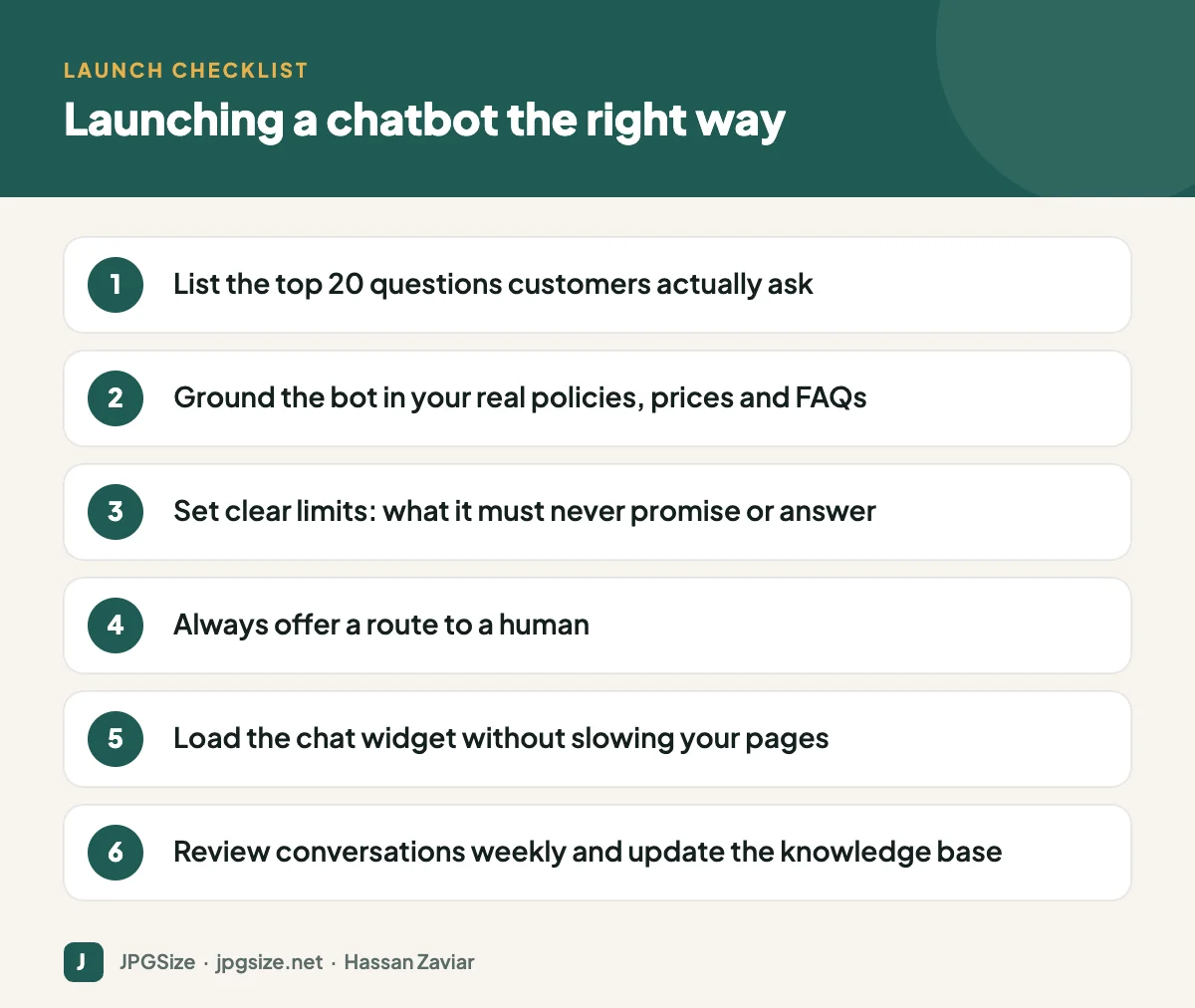
How to set up a chatbot, step by step
1. Collect the questions
Export emails, chat logs, call notes and social messages from the last few months. List the 20 most common questions and the best answer to each. This is your minimum knowledge base.
2. Write or clean up your knowledge base
The bot is only as good as its sources. Make sure your FAQ, shipping, returns and pricing pages are complete, current and consistent. Outdated pages lead to wrong answers.
3. Configure behaviour and limits
Define the tone, the topics it should handle, and what it must never do: promise refunds outside policy, give medical, legal or financial advice, share other customers’ information or make up answers. Instruct it to say when it does not know.
4. Design the human handover
Offer a clear option to reach a person at any point, and hand over automatically when the customer is frustrated or the question is sensitive. Pass the conversation history so the customer does not have to repeat themselves.
5. Install without hurting performance
Chat widgets can add significant JavaScript to every page and hurt Core Web Vitals, especially responsiveness (INP). Load the widget after the page has loaded or when the visitor clicks a chat button. See our website speed checklist.
6. Test, launch and review
Test with real questions, including awkward ones. After launch, read a sample of conversations weekly, fix knowledge gaps and track the resolution rate, handover rate and customer satisfaction.
Pitfalls that damage trust
- Invented policies. There have been public cases of chatbots promising refunds or discounts that did not exist, and at least one tribunal ruled that the company had to honour what its chatbot said. Ground answers in your policies and restrict promises.
- No escape route. Trapping customers in a loop with a bot is one of the fastest ways to lose them.
- Pretending to be human. Be transparent that customers are talking to an automated assistant; some jurisdictions require it.
- Collecting too much data. Only ask for what you need and explain why.
- Set and forget. Prices and policies change; the bot’s knowledge must change with them.
Measuring success
Track the number of conversations, the share resolved without a human, handover reasons, response time, customer satisfaction ratings and, for sales use cases, leads and bookings generated. Compare against your support workload before launch.
Example: a chatbot for a local service business
Consider a small dental clinic that receives around 40 messages a day, most asking about opening hours, prices for common treatments, whether it accepts a particular insurance plan and how to book. Here is a sensible setup:
- The knowledge base includes opening hours, a price range for each common treatment, accepted insurance plans, the address with parking information and the cancellation policy.
- The bot answers those questions directly and offers a booking link connected to the clinic’s calendar.
- Anything clinical, such as “Is this pain serious?”, triggers an immediate handover with a message explaining that a member of staff will reply, plus emergency contact details.
- Staff review ten conversations every Friday and add any new questions to the knowledge base.
The result is fewer routine calls, faster answers in the evening when people plan appointments, and staff time focused on patients, without the bot ever giving medical advice.
Chatbots and SEO
A chatbot does not directly affect rankings, but the work behind it helps. The questions customers ask the bot are excellent input for your content plan and FAQ pages, which support answer engine optimization. Just make sure the widget does not hurt page speed, and keep important information on normal, crawlable pages rather than only inside the chat.
Frequently asked questions
Is an AI chatbot worth it for a small business?
It is worth it if you get many repetitive questions or lose enquiries outside business hours. If you get a handful of messages a day, a well-organised FAQ page and quick human replies may be enough.
Can an AI chatbot give wrong answers?
Yes. Grounding it in your own knowledge base, restricting what it can promise and reviewing conversations reduce the risk significantly.
Will a chatbot slow down my website?
It can, because chat widgets load extra scripts. Load the widget on interaction or after the page has loaded to protect speed.
Should customers know they are talking to AI?
Yes. Transparency builds trust, and some regulations require disclosure that a customer is interacting with an automated system.
Sources and further reading
About the author: Hassan Zaviar writes about image optimization, SEO, AI and digital marketing for JPGSize and works on the site’s free browser-based image tools. Last reviewed: 24 September 2026. Spotted something out of date? Tell us and we will update it.

