
Few topics in SEO cause as much anxiety as AI-generated content. Some site owners have published thousands of AI pages and seen traffic collapse; others use AI every day and rank well. The difference is not whether AI was used, but how, and what the finished page offers readers.
Quick answer: Google does not penalise content simply because AI helped create it. It rewards helpful, reliable, people-first content and penalises content produced at scale mainly to manipulate rankings, however it is made. Use AI for research, outlines and drafts, then add first-hand experience, verify every fact, edit for quality and publish under a named, accountable author.
What Google actually says
Google’s guidance, published in February 2023 and reinforced since, is clear on the main points:
- Appropriate use of AI or automation is not against its guidelines.
- Using automation, including AI, to generate content with the primary purpose of manipulating search rankings is a violation of its spam policies.
- Its systems focus on the quality of content, rewarding content that demonstrates experience, expertise, authoritativeness and trustworthiness (E-E-A-T).
In March 2024 Google expanded its spam policies with a scaled content abuse policy. It covers generating many pages that provide little value to users, whether by AI, by people or by a combination. The same update folded the helpful content system into Google’s core ranking systems. Sites that relied on mass-produced, unedited pages were among those hit hardest.
Where AI genuinely helps SEO content
- Research: gathering the questions people ask around a topic, summarising competing pages and identifying gaps. Combine with real data from keyword research.
- Outlines: turning a topic and intent into a logical structure with question-based headings for answer engine optimization.
- First drafts of sections where the facts are known and verified.
- Rewriting and repurposing: simplifying technical text, creating summaries, turning an article into FAQs or social posts.
- Metadata: drafting title tags and meta descriptions to choose from.
- Technical tasks: writing schema markup, regular expressions, spreadsheet formulas and redirect maps.
Where AI hurts SEO content
- Invented facts: statistics, studies, quotes and specifications that do not exist. One fabricated number can undermine trust in an entire site.
- Sameness: AI drafts on popular topics converge on the same points in the same order as existing articles, adding nothing new. There is little reason for Google to rank another copy.
- No experience: AI cannot test your product, photograph your work or report what happened with your clients.
- Scale without oversight: publishing hundreds of pages faster than anyone can review them is the pattern that the scaled content abuse policy targets.
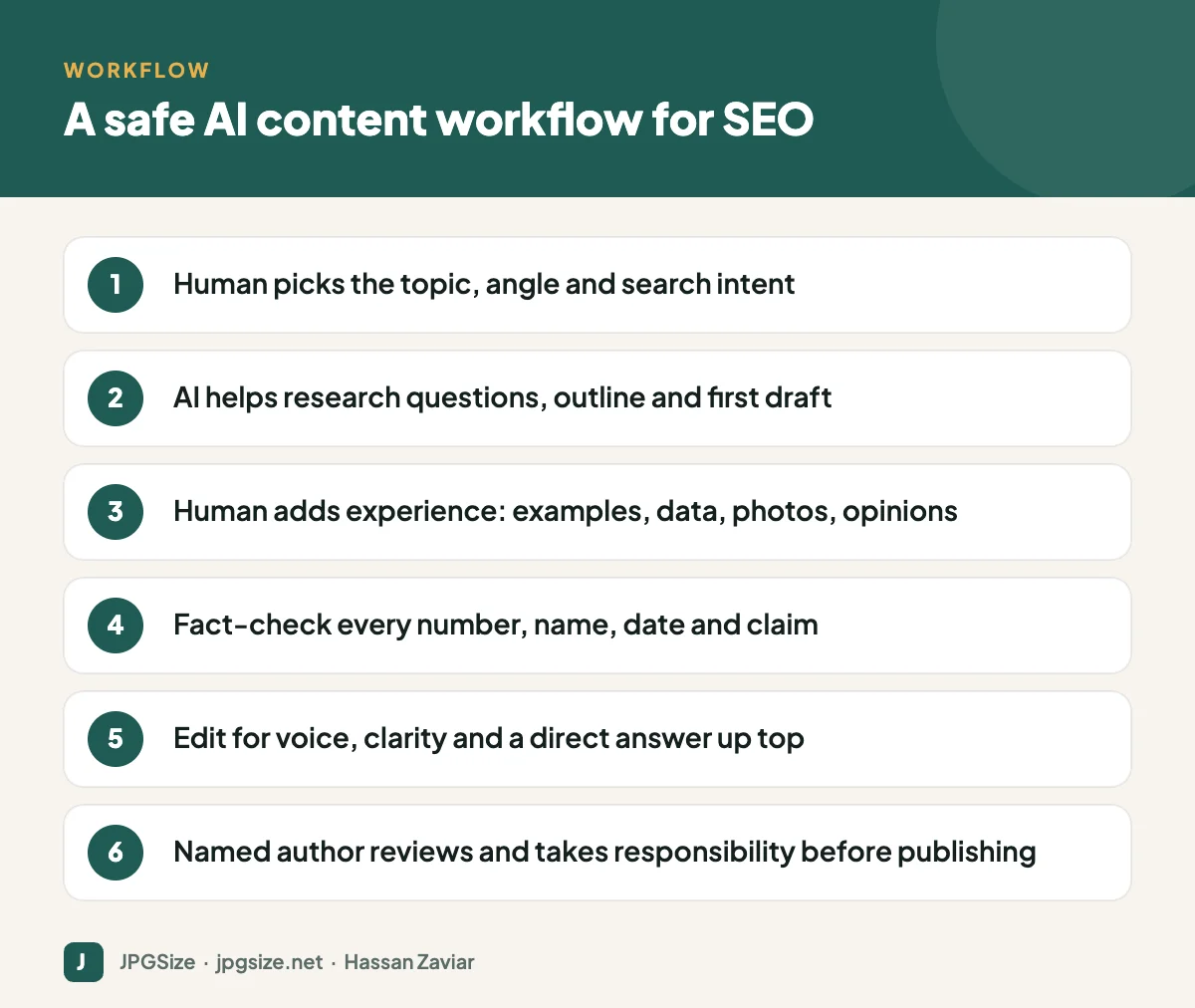
A human-in-the-loop workflow
1. Human sets the strategy
A person chooses the topic based on audience needs and business goals, checks the search intent by reviewing current results, and decides what unique angle the page will have: original data, a tool, a case study or expert opinion.
2. AI assists with research and structure
Use AI to list sub-questions, summarise sources you provide and propose an outline. Edit the outline so it matches the intent and your angle.
3. Draft with AI, but feed it real material
Give the model your notes, data, interview transcripts or product documentation. Instruct it to use only the facts you provided. See prompt engineering for marketers for how to brief it.
4. Add what only you can add
This is the step that separates helpful content from generic content: your screenshots and photos, test results, customer examples, opinions and recommendations, mistakes and lessons. For example, our WebP vs AVIF vs JPEG article includes a test we ran with specific settings and results.
5. Verify and edit
Check every statistic, name, date, price and specification against a primary source, and link to it. Rewrite anything that sounds generic, cut padding, put the direct answer at the top and make sure the brand voice is consistent.
6. Publish responsibly
Publish under a named author with a real bio who has reviewed and stands behind the content. Include publish and update dates. Link it into your topic cluster with a sensible internal linking strategy. Publish at a pace your team can review properly.
Should you disclose AI use?
Google says disclosure is useful where readers would reasonably wonder how content was created, for example with an author byline or a note on automated content. Many publishers add a short editorial policy explaining how AI is used and how content is reviewed. That transparency supports trust and costs little.
AI images in SEO content
The same principles apply to images. AI-generated illustrations are fine for concepts and headers, but original photos and screenshots demonstrate experience better. Whatever you use, optimise it properly with image SEO best practices, and consider copyright and labelling for synthetic images.
Red flags in your own content
Audit existing AI-assisted pages for these warning signs:
- Pages targeting slight keyword variations with nearly identical content.
- Articles with no author, no sources and no original elements.
- Paragraphs that could appear on any competitor’s site unchanged.
- Facts that have not been checked since publishing.
- Traffic that spiked after publishing and then fell steadily.
Improve or consolidate these pages, or remove them if they add no value.
A pre-publish checklist for AI-assisted articles
Before any AI-assisted page goes live, check that it passes these tests:
- Purpose: would this page exist if search engines did not? Does it help a real reader do something?
- Answer: is the main question answered clearly near the top?
- Originality: does it include at least one thing competitors do not have, such as a test, example, template, photo or expert view?
- Accuracy: has every fact, figure and name been checked against a primary source and linked where useful?
- Voice: does it sound like your brand rather than a generic assistant?
- Accountability: is a named author with relevant experience credited, and would they be comfortable defending every sentence?
- Experience: is the page fast, readable on mobile and properly linked into related content?
If a page fails the first three tests, no amount of editing will make it valuable. Choose a different angle or merge it into an existing article.
Frequently asked questions
Does Google penalize AI-generated content?
Not for being AI-generated. Google penalises low-value content produced mainly to manipulate rankings, including mass-produced AI content, under its spam policies.
Can AI content rank on Google?
Yes, if it is genuinely helpful, accurate and offers something useful, which in practice usually requires significant human input, expertise and editing.
How much AI is too much in SEO content?
There is no percentage rule. The question is whether the finished page is helpful, accurate and original enough to deserve to rank, and whether a responsible person has reviewed it.
Should I use AI detectors on my content?
AI detectors are unreliable and Google does not rank content based on them. Focus on quality, accuracy and originality instead.
Sources and further reading
- Google Search Central Blog: Google Search’s guidance about AI-generated content
- Google Search Central Blog: New ways we’re tackling spammy, low-quality content on Search (March 2024)
- Google Search Central: Spam policies
- Google Search Central: Creating helpful, reliable, people-first content
About the author: Hassan Zaviar writes about image optimization, SEO, AI and digital marketing for JPGSize and works on the site’s free browser-based image tools. Last reviewed: 24 September 2026. Spotted something out of date? Tell us and we will update it.

