
AI-generated images are now realistic enough to fool most people at a glance. For marketers, that matters in two directions: you need to avoid sharing fakes that damage your credibility, and you need to handle your own AI images transparently as platforms and regulators ask for labelling. Here is how detection actually works in 2026, and its limits.
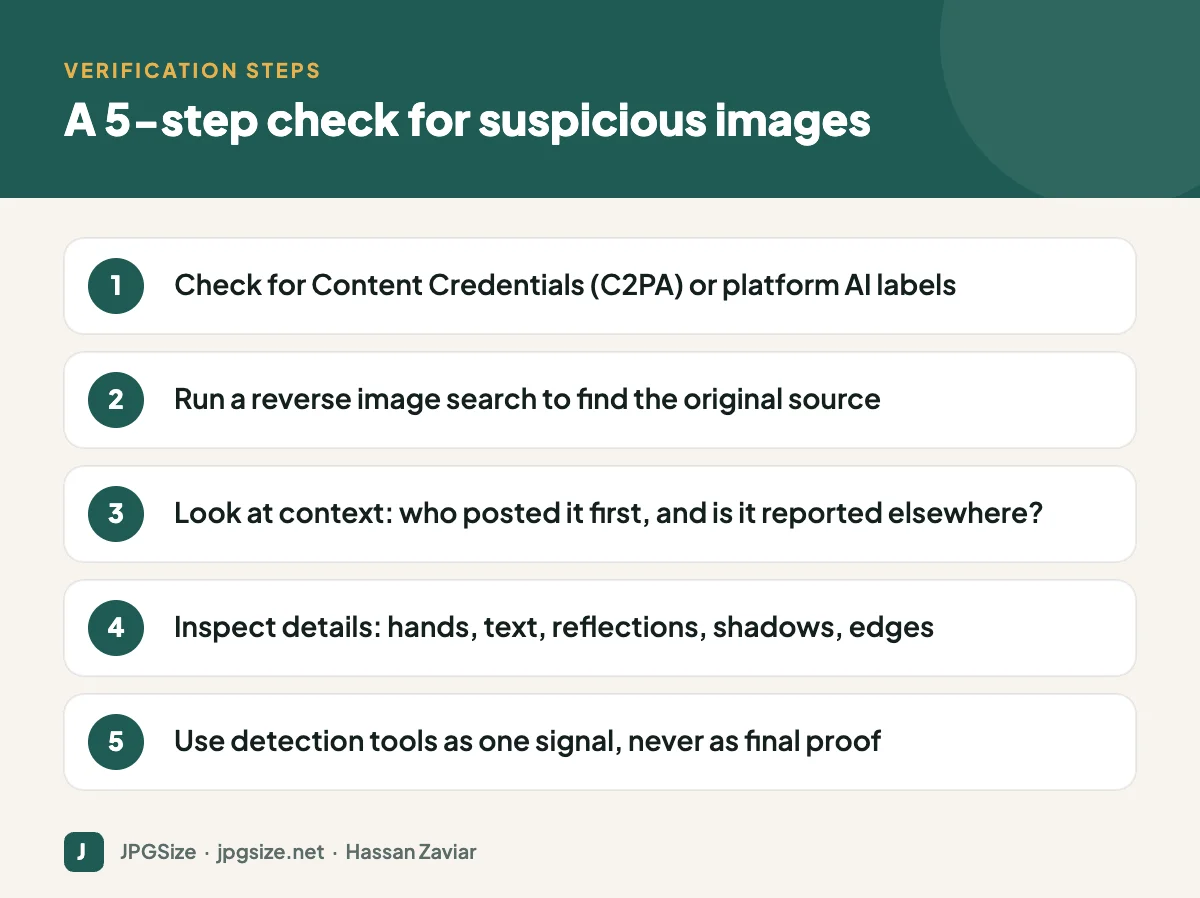
Quick answer: To check whether an image is AI-generated, first look for provenance data such as C2PA Content Credentials or platform labels, then run a reverse image search to trace the original source and check the context. Inspect details like text, hands, reflections and shadows, and treat AI detector tools as one signal rather than proof. No single method is reliable on its own.
Why spotting AI images is getting harder
Early image generators left obvious signs: extra fingers, melted faces, nonsense text. Current models have fixed many of these problems, and images are often edited, cropped, compressed and re-shared, which removes metadata and hides artefacts. Visual inspection alone is no longer dependable. The industry response has been to focus on provenance: recording where an image came from and how it was made.
Method 1: Provenance and Content Credentials (C2PA)
The Coalition for Content Provenance and Authenticity (C2PA) is an open standard backed by companies including Adobe, Microsoft, Google, OpenAI, Meta and camera makers. It attaches cryptographically signed information, known as Content Credentials, to a file. Credentials can record which camera or app created the image, whether AI generation was used, and what edits were made.
How to check:
- Upload the image to a Content Credentials verification tool, such as the one at contentcredentials.org.
- Look for the “CR” Content Credentials icon on sites and apps that display it.
- In Google Search and Google Images, the “About this image” feature can show information including whether an image was created or edited with AI, where that metadata is available.
Limitations: credentials can be stripped by screenshots or by platforms that remove metadata, and many images were never signed. The absence of credentials proves nothing.
Method 2: Invisible watermarks such as SynthID
Some AI companies embed invisible watermarks into the pixels of generated images. Google DeepMind’s SynthID is used in images generated by Google’s AI tools and is designed to survive common edits like cropping, resizing and compression. Google has also launched a SynthID detector for checking content. Other vendors use their own watermarking or metadata.
Limitations: each watermark can only be detected by its own tools, not every generator uses one, and determined actors can degrade watermarks.
Method 3: Platform labels
Major platforms now label AI content. YouTube requires creators to disclose realistic altered or synthetic content. Meta, TikTok and others apply “AI info” or similar labels based on C2PA metadata, invisible watermarks or self-disclosure. These labels are helpful, but they depend on the signals being present.
Method 4: Reverse image search and context
Often the fastest test is not about the pixels at all:
Often the fastest way to investigate an image is to trace its original source. Using a Reverse Image Search tool can help you find visually similar images, identify where an image has appeared online, and uncover its original context.
- Reverse search the image with Google Lens or other reverse image search tools. Find the earliest version and who posted it.
- Check the source: is it a known photographer, news agency or brand account, or an anonymous account created recently?
- Look for corroboration: if an image shows a real event, reputable outlets and other photos from different angles should exist.
- Read the comments and community notes, which often flag fakes quickly.
Method 5: Visual clues
Visual inspection still catches many fakes, especially quickly produced ones. Zoom in and look at:
- Text: signs, labels and logos with garbled letters or inconsistent fonts.
- Hands and teeth: extra, missing or merged fingers; unnaturally uniform teeth.
- Reflections and shadows: reflections that do not match the scene, shadows falling in different directions.
- Physics and geometry: jewellery fused into skin, glasses without arms, architecture with impossible lines.
- Backgrounds: faces in crowds that are smeared or repeated, objects that melt into each other.
- Texture: overly smooth, waxy skin or a polished “render” look.
None of these proves an image is AI-generated; real photos can have odd reflections and edited photos can look waxy. They are reasons to investigate further.
Method 6: AI detection tools
Many tools claim to detect AI images. Some work well on images from specific generators, but accuracy drops on new models, heavily edited images and compressed files, and false positives happen. Use them as one piece of evidence, never as the only basis for an accusation.
What marketers should do
- Verify before sharing. Especially for news-like content, product claims and anything involving real people.
- Label your own synthetic images where audiences would reasonably want to know, and follow platform rules. The EU AI Act also includes transparency obligations for certain AI-generated and manipulated content.
- Preserve Content Credentials in your workflow where possible; some tools let you attach them when exporting.
- Use real photos where authenticity matters, such as team pages, testimonials and product listings. See our guide on E-E-A-T.
- Understand the rights side too: read can you use AI-generated images commercially.
A newsroom-style verification routine for brands
If your team shares news, reacts to trends or reposts user content, adopt a lightweight verification routine:
- Pause before sharing any image that is surprising, emotional or too perfect, because those are the ones most likely to be fake.
- Find the original poster and check their history.
- Look for independent confirmation from reliable sources.
- Check provenance data where available.
- Document what you checked so anyone on the team can see why an image was approved.
- Correct quickly if you get it wrong: remove the post, explain the error and thank whoever flagged it.
This takes a few minutes, far less than recovering from sharing a fabricated image under your brand name.
Frequently asked questions
How can I tell if an image is AI-generated?
Check for Content Credentials or platform AI labels, reverse search the image to find its source, look closely at details like text, hands and shadows, and use detection tools as one signal. Combine several methods.
What is C2PA?
C2PA is an open technical standard for content provenance. It attaches signed metadata called Content Credentials that can show how an image was created and edited, including whether AI was used.
What is SynthID?
SynthID is Google DeepMind’s technology for embedding invisible watermarks in AI-generated content from Google’s tools, designed to remain detectable after common edits.
Are AI image detectors accurate?
They can be useful but are not reliable enough to be conclusive. Accuracy varies by generator, editing and compression, and false positives occur.
Sources and further reading
- C2PA: Coalition for Content Provenance and Authenticity
- Content Credentials
- YouTube Help: Disclosing use of altered or synthetic content
About the author: Hassan Zaviar writes about image optimization, SEO, AI and digital marketing for JPGSize and works on the site’s free browser-based image tools. Last reviewed: 24 September 2026. Spotted something out of date? Tell us and we will update it.

