
LinkedIn is where clients, recruiters and partners check whether you look credible. A blurry headshot, a stretched banner or a cropped post graphic sends the wrong signal before anyone reads a word. Here are the image sizes that matter in 2026 and how to design for them.
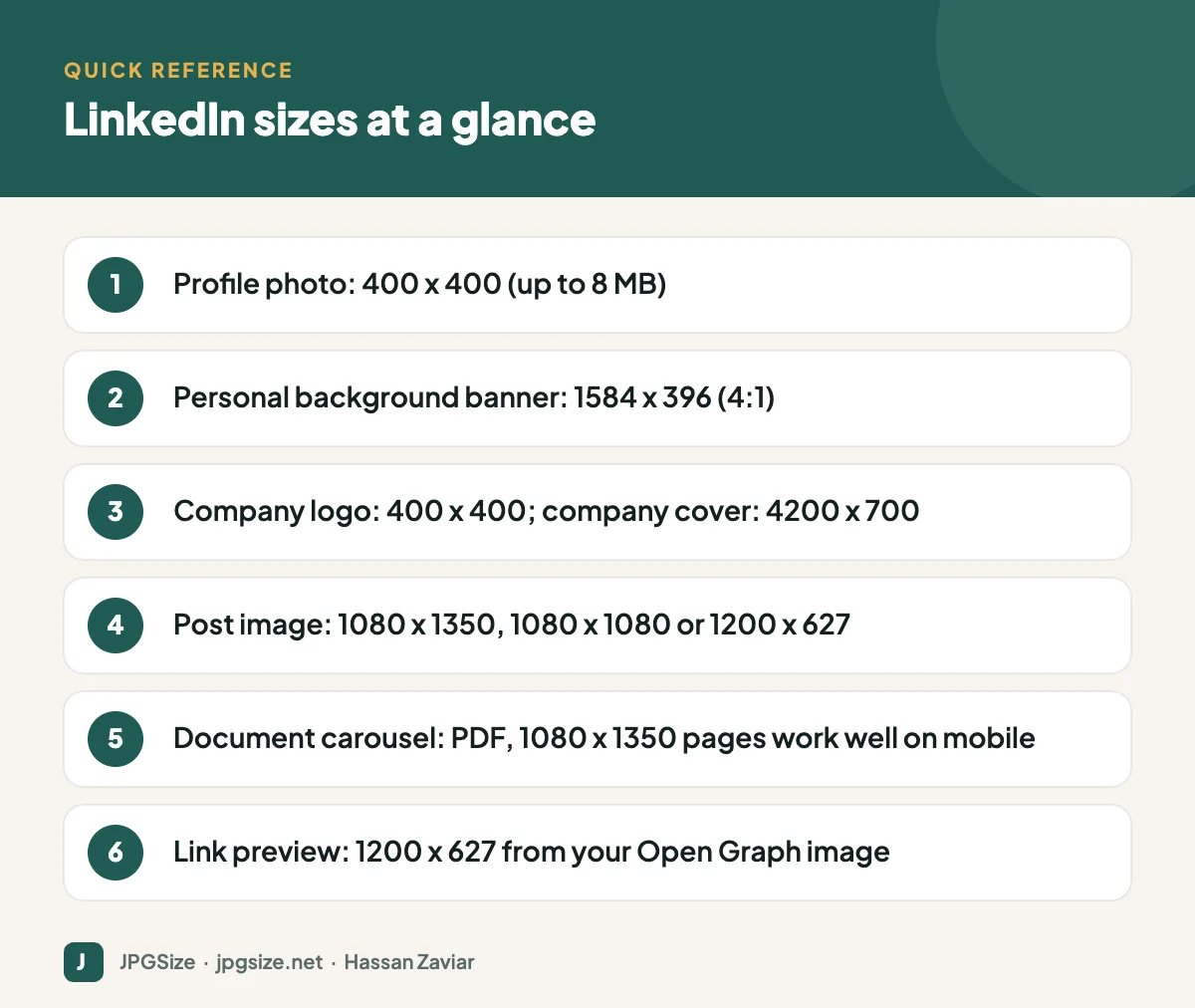
Quick answer: On LinkedIn in 2026, use a 400 x 400 pixel profile photo, a 1584 x 396 pixel personal background banner, a 400 x 400 company logo and a 4200 x 700 company cover image. For posts, 1080 x 1350 (portrait) or 1080 x 1080 (square) take the most feed space; 1200 x 627 suits landscape images and link previews.
Checked September 2026. LinkedIn occasionally changes how images display; preview on mobile after uploading.
LinkedIn image size table
| Image | Recommended size (pixels) | Ratio | Notes |
|---|---|---|---|
| Personal profile photo | 400 x 400 | 1:1 | Up to 8 MB; shown as a circle |
| Personal background banner | 1584 x 396 | 4:1 | Up to 8 MB |
| Company page logo | 400 x 400 | 1:1 | Square, simple logo |
| Company page cover | 4200 x 700 | 6:1 | Keep content centred |
| Post image, portrait | 1080 x 1350 | 4:5 | Most feed space on mobile |
| Post image, square | 1080 x 1080 | 1:1 | Works everywhere |
| Post image, landscape | 1200 x 627 | 1.91:1 | Smaller in the feed |
| Article or newsletter cover | 1920 x 1080 | 16:9 | Shown above long-form posts |
| Link preview | 1200 x 627 | 1.91:1 | From your website’s og:image |
Profile photo
Your headshot is the most viewed image on your profile. Upload a square photo of at least 400 x 400 pixels; larger is fine up to 8 MB. Frame your face so it fills about 60% of the circle, use soft even light and a simple background, and look at the camera. Our guide to professional profile photos covers lighting and cropping in detail.
Personal background banner
The banner is 1584 x 396 pixels (4:1). On desktop, your profile photo overlaps the lower left; on mobile, the banner is shown differently and more of the sides may be hidden. Keep text and key visuals slightly right of centre and away from the bottom left. Good banner ideas include your company tagline, a clean photo of your work, or a simple statement of what you help people do.
Company page images
Use a 400 x 400 logo with padding so it is not cropped. The cover image is 4200 x 700 pixels; LinkedIn recommends this large size so it stays sharp on wide screens. Because the displayed crop varies by device, keep the logo, tagline and key visuals in the centre.
Post images
Portrait (4:5) and square images occupy more vertical space in the mobile feed than landscape images, which tends to earn more attention. Use:
- 1080 x 1350 for single images you want to stand out.
- 1080 x 1080 for images you share across several platforms.
- 1200 x 627 for landscape photos and screenshots.
Multi-image posts are arranged in a grid by LinkedIn; for step-by-step content, a document carousel usually works better.
Document carousels
LinkedIn lets you upload PDFs that display as swipeable slides. Design each page at 1080 x 1350 (portrait) or 1080 x 1080 (square), use large text, one idea per slide and a strong first slide that works as a hook. Keep the file reasonably small so it loads quickly on mobile.
Link previews
When you share a URL, LinkedIn builds the preview from the page’s Open Graph tags. Set og:image to a 1200 x 627 (or 1200 x 630) image with a clear focal point. If the preview is wrong or outdated, use LinkedIn’s Post Inspector to refresh it. See our Open Graph image guide.
Design tips for LinkedIn
- Keep branding consistent with your website and other channels; see visual brand identity.
- Use real photos of your team and work. They build trust, which matters for E-E-A-T on your website as well as on LinkedIn.
- Put a short, readable headline on graphics; many people scroll with sound off and little time.
- Export in sRGB, and compress sensibly with our JPG compressor without shrinking below the recommended dimensions.
Common LinkedIn image mistakes
- Using a cropped group photo as a headshot.
- Uploading a banner with text near the edges, where it gets cut off on mobile.
- Sharing landscape screenshots with tiny text that nobody can read on a phone.
- Forgetting to set an Open Graph image on your website, so shared links appear without an image.
For every platform in one place, see the social media image sizes cheat sheet.
LinkedIn images for company pages that convert
A company page is often the first place a prospect or candidate checks after hearing your name. Treat the images as part of the pitch:
- Cover image: show what you do or who you help, in one clear visual and a short line of text. Update it for major launches, hiring drives or events.
- Logo: make sure it is readable at small sizes; if your full logo has a long wordmark, use the symbol alone.
- Life tab and posts: real photos of your team, office and events build trust with candidates far more than stock images.
- Product showcases: use clean screenshots or product photos at the recommended sizes, with large enough text to read on a phone.
Accessibility on LinkedIn
LinkedIn lets you add alternative text to images in posts. Use it to describe what the image shows, especially for charts and screenshots, so people using screen readers get the same information. The principles are the same as on your website; see how to write alt text. For document carousels, make sure the post text summarises the key points, because not everyone will swipe through every slide.
Preparing images quickly
For a consistent look, create three templates in your design tool: a 1080 x 1350 post, a 1080 x 1080 post and a 1200 x 627 landscape post, each with your fonts, colours and logo placement. Then producing a new graphic takes minutes, and every post looks like it belongs to the same brand.
Frequently asked questions
What is the LinkedIn banner size in 2026?
The personal profile background banner is 1584 x 396 pixels. Company page covers are 4200 x 700 pixels.
What is the best image size for a LinkedIn post?
1080 x 1350 (4:5 portrait) takes the most feed space on mobile. 1080 x 1080 square is a good cross-platform option, and 1200 x 627 suits landscape images.
What size should a LinkedIn profile picture be?
At least 400 x 400 pixels, square, up to 8 MB. It is displayed as a circle, so centre your face.
How do I fix the image on a shared LinkedIn link?
Update the og:image tag on your web page, then use LinkedIn’s Post Inspector to refresh the cached preview.
Sources and further reading
About the author: Hassan Zaviar writes about image optimization, SEO, AI and digital marketing for JPGSize and works on the site’s free browser-based image tools. Last reviewed: 24 September 2026. Spotted something out of date? Tell us and we will update it.

