
Facebook remains one of the largest platforms for small businesses, communities and local marketing, especially in South Asia. Its image sizes are simple for posts, but the cover photo and profile picture are displayed differently on desktop and mobile, which catches out many page owners.
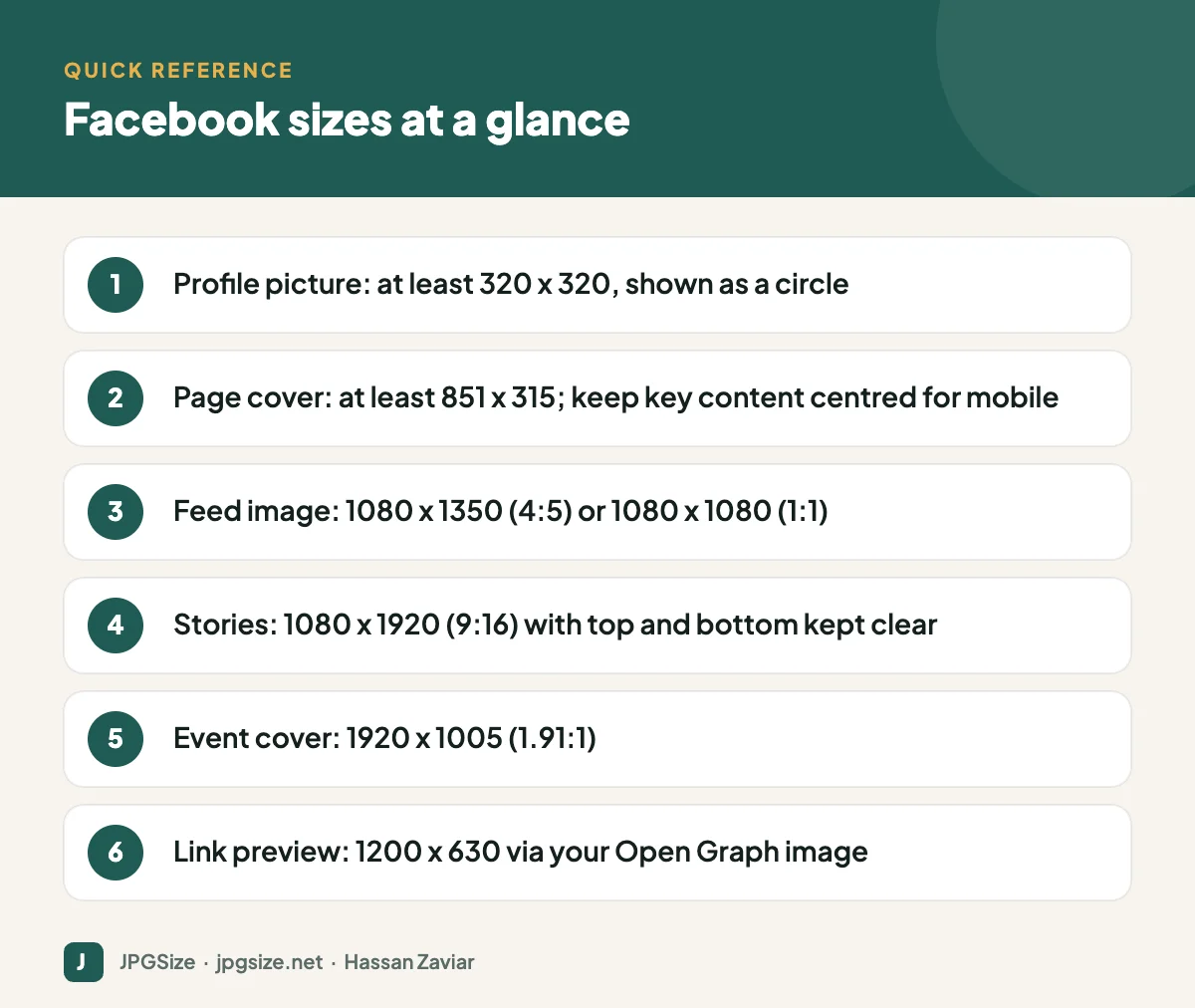
Quick answer: For Facebook in 2026, use a profile picture of at least 320 x 320 pixels, a page cover photo of at least 851 x 315 pixels with important content in the centre, 1080 x 1350 (4:5) or 1080 x 1080 for feed images, 1080 x 1920 for Stories, 1920 x 1005 for event covers and 1200 x 630 for link previews.
Checked September 2026. Facebook adjusts layouts periodically; preview on both desktop and mobile after uploading.
Facebook image size table
| Image | Recommended size (pixels) | Aspect ratio | Notes |
|---|---|---|---|
| Profile picture | 320 x 320 or larger | 1:1 | Displayed as a circle |
| Page cover photo | At least 851 x 315 | About 2.7:1 | Cropped differently on mobile |
| Feed image, portrait | 1080 x 1350 | 4:5 | Most screen space on mobile |
| Feed image, square | 1080 x 1080 | 1:1 | Safe all-rounder |
| Feed image, landscape | 1200 x 630 | 1.91:1 | Smaller in mobile feeds |
| Stories | 1080 x 1920 | 9:16 | Keep text in the centre |
| Event cover | 1920 x 1005 | 1.91:1 | Shown across the event page |
| Group cover | 1640 x 856 | About 1.91:1 | Check mobile crop |
| Shared link preview | 1200 x 630 | 1.91:1 | Set by your website’s Open Graph tags |
Profile picture
Upload a square image of at least 320 x 320 pixels; a larger square such as 720 x 720 gives a sharper result on high-density screens. Facebook displays it as a circle, overlapping the cover photo on your page. For businesses, a simple logo with padding around it is best. For personal branding, a clear, well-lit headshot works better than a full-body shot; see professional profile photos.
Page cover photo: sizes and safe zones
The cover photo causes the most confusion because Facebook shows it at different proportions on desktop and mobile. Desktop shows a wider, shorter crop; mobile shows a taller, narrower one. Facebook’s minimum is 851 x 315 pixels, but many designers upload at double size, for example 1702 x 630, for sharper display on high-resolution screens.
To avoid important content being cut off:
- Keep text, faces and logos in the central area of the image.
- Leave space at the bottom left where the profile picture overlaps on some layouts.
- Avoid small text; it becomes unreadable on phones.
- Preview on both desktop and mobile after uploading and adjust.
Feed posts
Portrait images (4:5, 1080 x 1350) take up the most space in the mobile feed, which is where most Facebook browsing happens. Square images are a safe choice if you post the same visual across platforms. Landscape images appear smaller and are best for wide scenes and link previews.
For multi-image posts, Facebook arranges images into a collage whose layout depends on the number and orientation of photos. If the layout matters, use a carousel ad format or post a single designed image instead.
Stories and Reels
Stories and Reels use 1080 x 1920 pixels (9:16). The profile name appears at the top and reply and action controls at the bottom, so keep text and logos away from both edges. A useful rule is to keep the top 250 pixels and bottom 340 pixels free of important content.
Link previews
When you share a URL on Facebook, the preview image comes from the page’s Open Graph tags, specifically og:image. Use 1200 x 630 pixels for a sharp, full-width preview. If Facebook shows an old or wrong image, use Meta’s Sharing Debugger to scrape the page again. Our Open Graph image guide covers setup in WordPress.
Facebook ad image sizes
Meta ads use the same core ratios. Upload 1:1 or 4:5 images for Facebook and Instagram feeds and 9:16 for Stories and Reels placements, at least 1080 pixels wide. Meta no longer enforces the old “20% text rule”, but images with less text generally perform better and pass review more smoothly.
How to stop Facebook making images blurry
- Upload at the recommended size, not larger than necessary and never smaller.
- Use high-quality sRGB JPEG for photos and PNG for graphics with text.
- Avoid uploading images that have already been compressed several times, such as downloads from WhatsApp.
- Keep text large and bold.
Our guide to why social media lowers photo quality explains the compression process. For all platforms together, see the social media image sizes cheat sheet.
Facebook images for local businesses
For local businesses, Facebook often acts as a second website. Use the cover photo to show your storefront, team or best-selling product, keep contact details and opening hours accurate in the page info, and post real photos regularly. The same photos can strengthen your Google Business Profile, where customers compare local options.
Facebook image checklist before you post
- Is the image the right ratio for where it will appear (4:5 or 1:1 for the feed, 9:16 for Stories)?
- Is it at least 1080 pixels wide?
- Is any text large enough to read on a phone, and kept away from edges?
- Is it an original export rather than a screenshot or a re-downloaded copy?
- For links, does the page have a correct og:image, and does the preview look right in the Sharing Debugger?
- Have you added alt text or a descriptive caption where the image carries important information?
Facebook groups and events
Groups and events have their own cover images. Group covers display wide on desktop and are cropped on mobile, so keep the group name and key visual in the centre. Event covers at 1920 x 1005 pixels appear on the event page and in invitations; include the event name, date and a strong image, but keep text minimal because Facebook already shows the event details beneath the cover. If you run regular events, create a template so each new cover takes minutes rather than hours.
Frequently asked questions
What size is a Facebook cover photo in 2026?
Facebook’s minimum is 851 x 315 pixels. Upload at double size (for example 1702 x 630) for sharpness, and keep important content in the centre because mobile crops the sides.
What is the best Facebook post image size?
1080 x 1350 pixels (4:5) for maximum mobile visibility, or 1080 x 1080 for a square format that works across platforms.
Why does my Facebook link show the wrong image?
Facebook uses your page’s og:image tag and caches it. Update the tag, then use the Sharing Debugger to refresh the cached preview.
What size should a Facebook profile picture be?
At least 320 x 320 pixels, square. Centre the subject because it is displayed as a circle.
Sources and further reading
About the author: Hassan Zaviar writes about image optimization, SEO, AI and digital marketing for JPGSize and works on the site’s free browser-based image tools. Last reviewed: 24 September 2026. Spotted something out of date? Tell us and we will update it.

