
When someone shares your page on Facebook, LinkedIn, WhatsApp, X, Slack or Discord, the app builds a preview card with a title, description and image. That image usually comes from a single line of HTML: the Open Graph og:image tag. Get it right and every share looks like a polished advert; get it wrong and your links appear with a random logo, a cropped face or no image at all.
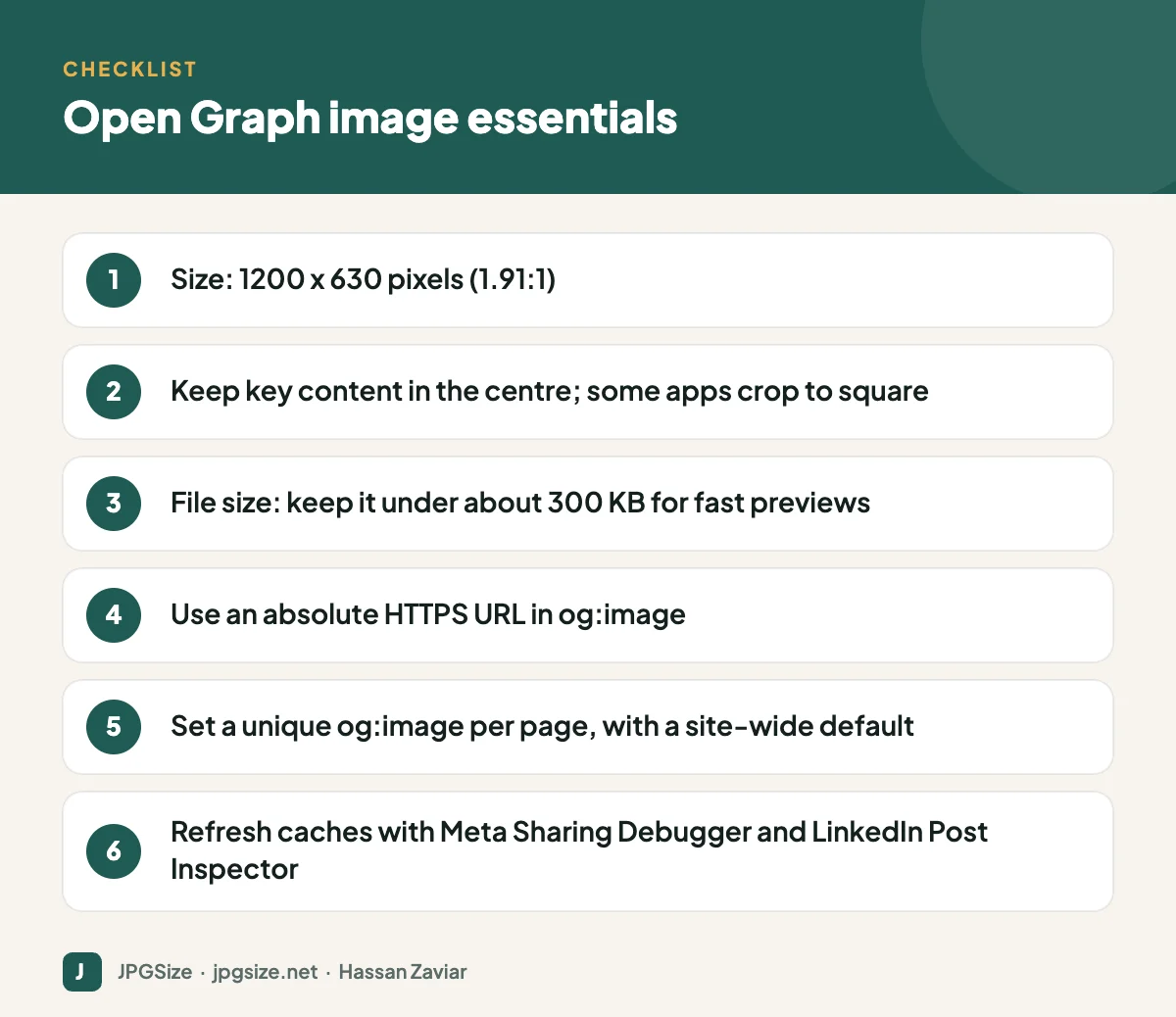
Quick answer: Set an og:image meta tag on every page pointing to a 1200 x 630 pixel image (1.91:1) with an absolute HTTPS URL. Keep important content in the centre because some apps crop to a square, keep the file reasonably small, and use a site-wide default for pages without their own image. After changes, refresh cached previews with Meta’s Sharing Debugger and LinkedIn’s Post Inspector.
What Open Graph is
The Open Graph protocol was created by Facebook in 2010 to let web pages describe themselves when shared. Most social platforms and messaging apps now read the same tags:
- og:title: the title shown in the preview.
- og:description: the short description.
- og:image: the preview image URL.
- og:url: the canonical URL of the page.
- og:type: for example website or article.
X (Twitter) uses its own twitter:card tags but falls back to Open Graph tags when they are missing. A summary_large_image card shows a large image similar to other platforms.
The right Open Graph image size
| Use | Size | Notes |
|---|---|---|
| Recommended og:image | 1200 x 630 px | 1.91:1; sharp on high-density screens |
| Minimum for large previews | 600 x 315 px | Smaller images may show as a small thumbnail |
| X large image card | 1200 x 628 px | Practically the same as 1200 x 630 |
| Square crops (some apps) | Centre of the image | WhatsApp and some chat apps may show a square thumbnail |
Keep the file light, ideally under about 300 KB, because some apps time out or skip large images. JPEG or PNG are the safest formats for previews. Our JPG compressor and resize image in pixels tools help produce the right file.
How to set Open Graph images in WordPress
SEO plugins handle this for you:
- Rank Math: in the post editor, open Rank Math’s settings, go to the Social tab and set a Facebook image (used as og:image) and optionally a separate X image. If you leave it empty, Rank Math uses the featured image, then the site-wide default from the plugin’s settings.
- Yoast SEO and others work similarly, with a Social section in the post editor.
- Set a default image in your SEO plugin for pages without a featured image, such as your homepage or tool pages.
On this site, every article’s featured image is designed at 1200 x 630 pixels so it doubles as the Open Graph image.
Designing Open Graph images that get clicks
- Put the article title or key message on the image in large type. Previews often display the image larger than the text.
- Keep text and faces in the centre; some apps crop the sides or show a square.
- Brand it consistently with your logo and colours, so people recognise your content in busy feeds. See visual brand identity.
- Avoid tiny details that disappear at thumbnail size.
- Use a unique image for each page. Sharing ten links that all show the same logo tells people nothing.
Debugging link previews
Platforms cache previews, sometimes for weeks. If you change the image and still see the old one:
- Facebook, Instagram and WhatsApp (Meta): paste the URL into Meta’s Sharing Debugger and click “Scrape Again”. WhatsApp keeps its own cache and may take longer to update.
- LinkedIn: use Post Inspector to refresh the preview.
- X: previews update when X recrawls the page; checking the tags with a validator or simply reposting after some time usually works.
- Slack and Discord: they fetch previews when a link is first posted; changes appear for new posts.
Common causes of missing or wrong images include relative image URLs, images blocked by robots.txt or security plugins, images that are too small, and pages behind a login or cookie wall. Enterprise websites often work with dedicated Cybersecurity Services to configure firewalls, security plugins, and access controls properly so that critical media assets remain securely protected without unintentionally blocking search engine crawlers or legitimate visitors.
Open Graph and SEO
Open Graph tags are not a Google ranking factor, but they influence how often your content is clicked and shared, which drives traffic and brand awareness. They also complement structured data, which Google does use; see structured data for images. Make sure both point to the same high-quality image where possible. For the broader picture, read our image SEO guide.
A quick test before you publish
Before promoting a new page, paste its URL into a private message to yourself on WhatsApp and into a draft post on LinkedIn or Facebook (without publishing). Check that:
- The image appears and is the one you intended.
- The title is complete and not cut off mid-word.
- The description is readable and specific to the page.
- Nothing important in the image is cropped.
It takes two minutes and catches most problems before customers see them.
Open Graph images at scale
If your site has hundreds of pages, designing each preview by hand is not realistic. Options include:
- Templates: a branded background with the page title added automatically. Many SEO plugins, themes and image services can generate these dynamically.
- Featured images designed for sharing: if every post has a 1200 x 630 featured image with the title, your SEO plugin can use it automatically, which is the approach this site uses.
- Category defaults: a distinct default image per category or product type, so even pages without a unique image get a relevant preview.
Whatever the method, review a sample of pages each quarter, because theme or plugin updates can quietly change which image is used.
Frequently asked questions
What is the best Open Graph image size?
1200 x 630 pixels at a 1.91:1 aspect ratio works across Facebook, LinkedIn, X and most messaging apps.
Why is Facebook showing the wrong image for my link?
Facebook caches previews. Check that your og:image tag is correct, then use the Sharing Debugger to scrape the page again.
Does WhatsApp use Open Graph images?
Yes. WhatsApp reads og:image and other Open Graph tags. Keep the image reasonably small and important content centred, because WhatsApp may display a smaller or square thumbnail.
Do Open Graph tags help SEO?
Not directly as a ranking factor, but attractive previews increase clicks and shares, which support traffic and visibility.
Sources and further reading
About the author: Hassan Zaviar writes about image optimization, SEO, AI and digital marketing for JPGSize and works on the site’s free browser-based image tools. Last reviewed: 24 September 2026. Spotted something out of date? Tell us and we will update it.

